Due: Midnight (i.e., 11:59:59pm), Saturday, May 4th, 2013
Overview
For Lab 3, you will extend the Tribbler service to include several different Tribbler servers supported by a number of backend Key Value Storage servers. In order to provide you with more flexibility, you will be implementing your own backend Key Value servers. How you implement you backend Key Value server is entirely up to you, however, it should offer the same RPC interface to the Tribbler server that was offered in Lab 2.
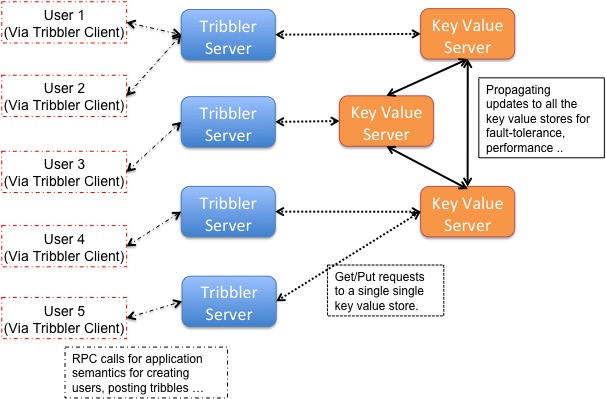
Each Tribbler server will make RPC calls to exactly one backend Key Value Store server which will be specified on the command line when starting the Tribbler server (just like in Lab 2). There can be multiple Tribbler servers that make RPC calls to the same Key Value server. Each Tribbler server will again be stateless and also be unaware of the existence of the other Tribbler servers. It is responsibility of the cluster of the backend Key Value servers to ensure that the clients connected to the different Tribbler servers see a consistent stream of Tribbles. For Lab 3, you will have different requirements on ordering tribbles posted by different users at different servers and handling failures of backend servers which are described in the following sections.
At a high level, the distributed Tribbler architecture is similar to the architecture shown in the following figure. The main challenge in Lab 3 is to handle the communication between the multiple key value servers while meeting the ordering and failure handling requirements.
Key Value Servers
You backend Key Value servers will take a set of command-line arguments including its ID number (which is guaranteed to be unique in the system), a port number to use for servicing RPC calls, and a list of hostnames and ports for the other Key Value servers in the network. The different backend servers form a peer-to-peer network where a backend server can act as a client to invoke storage RPC calls on another backend server.
Since each Tribbler server will only make RPC calls to a single backend server. RPC calls that update the key-value store, namely AddToList, RemoveFromList and Put RPC calls, need to be forwarded to other backend key value servers before sending the response back to the Tribbler server. This needs to be done to ensure that all the keys are replicated at all the backend key value servers.
The Get and GetList RPC calls received by the backend storage server that do not require updating keys will be served locally.
Assumptions
You are allowed to assume the following (non-realistic) things about the backend server:
- All servers will have a globally unique identifier, specified at startup.
- Every server will be provided with the location of all other servers at startup. No servers other than those specified on the command line will join the network. Specified servers may join at arbitrary points in time, however, and, indeed, may never actually join.
- A server may die, but will never return with the same identifier during the lifetime of the system. In other words, you can assume fail-stop behavior. If a server cannot "connect" to another backend key value server, you can assume that the other key value server is either dead or hasn't joined.
- You can assume that the backend server hostname and ports provided on the commandline are provided in order of increasing server id to all the backend servers.
- The maximum propagation delay between any two servers is 100 ms. The delay between any client and its server is negligible.
- The network never drops any packets.
Requirements
In order to be consistent in terms of tribbles displayed by different servers we impose the following requirements.
- A posted tribble is either seen by ALL the other users who have subscribed to the user making the post or by NONE of the users subscribed to that user.
- Backend servers or Tribbler servers can join or fail at any time. Since a Tribbler server is stateless, it should be possible to restart the Tribbler server transparently in case it crashes.
- A backend server that joins later need not display the tribbles posted before the server joined the system. However, if a re-tribb is posted after a server has joined but the original tribble was posted before the server was started, the server can choose not to not display the original tribble. However, if it chooses to display the original tribble, the ordering between the original and re-tribb ed post must be maintained.
- While forwarding the RPC calls to the other backend servers, the server should report error to the Tribbler server that initiated the RPC calls if any of the other live backend servers report error.
- Each backend server must forward the RPC calls that modify the backend store to all other live backend servers.
- The Tribble service should continue despite the failure of one or more backend servers. Any Tribbler server connected to a dead backend server may not be able to get or add further tribbles/subscriptions, but Tribbler servers connected to live backend servers must continue to be able to get and add/remove tribbles/subscriptions.
- Your backend servers must work both with servers running on the same machine (on a different port) and different machines.
- A backend server need not include a recently posted tribble in the GetTribble* RPC calls made by the Tribbler server, and, most likely, should buffer them for some period of time to allow reordering and meet consistency requirements. However, it must include the posted tribble in any GetTribbles() or GetTribblesBySubscription request made after two seconds of the original submission of the tribble at an initial backend server---assuming the original server is still alive. i.e. the maximum allowed delay between posting a tribble and getting the tribble is 2 seconds.
- You cannot depend on the local server clocks to be synchronized.
- In addition to the above requirements, you should also provide the following ordering requirements while displaying the posted tribbles.
Tribble Ordering
In the distributed Tribbler world, different users may be submitting their tribbles to different servers and you will need to order these tribbles relative to each other in order to create the response for GetTribblesBySubscription RPC call for the Tribbler client. However, you can no longer use server clock time as the ordering primitive to get a total order on the tribbles posted on different servers since the server clocks may be skewed relative to each other. Note that there still exists a total order for posts made to the same Tribbler server. Since the Tribbler servers cannot hold any state, you can offload the task of assigning timestamps to the posted tribbles to the backend storage server.
A Tribbler user can re-post a tribble an originally posted by another user that the re-tribbing user was subscribed to. We call this as re-tribbing or RT. For instance in the following example, Bob re-tribbs Alice's post:
Alice: Hi
Bob: [RT@Alice] Hi
More Assumptions
- Users will never simultaneously connect to two tribble servers. In other words, a user will connect to a different Tribbler server only after she has received the updates she has made at the first server.
- A user can never be simultaneously created at two different Tribbler servers. Here simultaneously means happening at a time scale of 2 seconds. If an attempt is made to create a user at TribblerServer2 two seconds after creating the user on TribblerServer1, TribblerServer2 should return EEXISTS because it should have received the update about the newly created user from TribblerServer1 within two seconds.
More Requirements
In addition to displaying only the 100 most recent tribbles posted across subscriptions (from Lab 2), we also add a constraint on the order in which the posts are displayed to the user. The ordering requirement for displayed tribbles is as follows:- Tribbles posted by a single user should be displayed in the reverse chronological order in which they were posted.
- If there is a third user who is subscribed to the user who re-tribbed as well as the user who made the original tribble, the original tribble should be displayed before the re-tribbed post. (The posts should be displayed in reverse chronological order, which means that the original post should appear below the re-tribbed post.)
Example
Consider the following scenario with three users: Alice, Bob and Cindy. Each user connects to a different Tribbler server.
subs:Alice = {}
subs:Bob = {Alice}
subs:Cindy = {Alice, Bob}

tribbles:Alice = {"ATribble2", "ATribble1"} // Tribbles in reverse chronological order
tribbles:Bob = {"[RT@Alice] ATribble2", "BTribble1"} // Tribbles in reverse chronological order
Now when Cindy invokes GetTribblesBySubscription, any of the following responses
is a valid response:
{"[RT@Alice] ATribble2", "ATribble2", "BTribble1", "ATribble1"}
{"[RT@Alice] ATribble2", "BTribble1", "ATribble2", "ATribble1"}
{"[RT@Alice] ATribble2", "ATribble2", "ATribble1", "BTribble1"}
This is because each of the above responses maintains the relative ordering
between
i) Tribbles posted by the same user: "ATribble2" appears after "ATribble1" and
"[RT@Alice] ATribble2" appears after "BTribble1" and,
ii) Re-tribbed tribble and the original tribble: "[RT@Alice]: ATribble2" appears
after "ATribble2".
Getting started
Differences From Lab 2: The first thing you need to do for Lab 3 is to build your own backend Key Value server and integrate it with your Tribbler server and offer the same service abstraction to the client that was offered in Lab 2. This should be relatively easy to implement by taking the Tribbler server you implemented in Lab 2, along with the following modifications.- As mentioned previously, a Tribbler server only interacts with a single backend server. It is the responsibility of the backend server to further propagate the updates made by the Tribbler server to other backend servers. To do this, a backend server can connect to the other backend servers as a RPC client and then invoke the RPC calls provided for updating the key value store at that server. You will want to distinguish a state updating RPC call made by a Tribbler server (since it will need to be forwarded) and an RPC call made by another backend server. To idenity the client which made the RPC call at the server, we've slightly modified the AddToList, RemoveFromList and Put RPC calls. The new RPC interface requires the RPC client to provide a clientid in addition to the key, value arguments. You are also welcome to replace or further refine the interface.
- The 'posted' field in the Tribble structure is now a list of integers as opposed to a single integer value. This is provided so that you can send vector timestamps to your Tribbler server, in case you need to. You should feel free to further redefine it if necessary.
Once you have the basic Tribbling working, you can extend the backend key value server functionality to support the Dribbler abstraction where each a single Tribbler server makes updates to a single backend server, while ensuring the failure and the ordering constraints in the Dribbler world.
Starting Key Value Server: The starter code for lab3 has been provided here:/classes/cse223b/sp13/labs/lab3/lab3.tar.gzCopy the lab3.tar.gz to a personal directory and then navigate to that directory.
export LD_LIBRARY_PATH=/usr/local/lib (You can add also this to your ~/.bashrc or ~/.bash_profile to avoid doing it again)
tar xzvf lab3.tar.gz
cd lab3/src
make
./kv_server 1 2255 localhost 2256
Here 1 is the globally unique ID of this server, and 2225 is the port you want it to listen on. localhost and 2256 are the hostname and port of another server in the network. You can have as many hostname:port pairs as you'd like. During development you're likely to want to use something other than 2225 so it doesn't conflict with other students working on their projects. For the sake of discussion, start another server in a separate window with a similar command:
./kv_server 2 2256 localhost 2255Starting Tribbler Server: You can start the Tribbler server using the following commands:
./tribbler_server localhost 2255 7890
./tribbler_server localhost 2256 7891
This assumes localhost is where the backend storage servers are running. 7890 is the port on which your Tribbler server listens on for client connection. You should change 2255, 2256 and 7890, 7891 to some other port number to avoid conflicts with server run by other students. The Tribbler server code has wrapper functions for Get, Put, GetList etc. that will invoke the RPC on the backend storage server. It is possible that when you start your server you see the following error:
Thrift: Thu Apr 11 09:49:33 2013 TServerSocket::listen() BIND 2255
terminate called after throwing an instance of
'apache::thrift::transport::TTransportException'
  what():  Could not bind: Transport endpoint is not connected
Aborted
If you see this error, it means that the port number you chose for your Tribbler/Key Value server is already being used and you should restart your server on another port.
Tribbler Client in Browser: We have a browser based Tribbler client running on sysnet91 that talks to a sample Tribbler server. You can access the browser based Tribbler client by typing the following url in your browser:
http://sysnet91.sysnet.ucsd.edu/webserver/?userid=malveekaYou specify the hostname and port numbers of the different Tribbler servers in order to invoke RPC calls on different Tribbler servers in the cluster.
Deliverable
You will be turning in the source folder that contains your implementation of the Tribbler_server.cpp and KeyValue_server.cpp. If your storage server requires additional files or running additional software you should include all the additional files in the submission directory and clearly specify instructions on how to run your backend Key Value Store. To submit your code to the submission directory, navigate to lab3/src folder and run the following commands.make turninThis command will create a file called user-turnin.tgz, where user is your user ID, and copy it to the submission directory. make sure that all the files I need to compile your code are in this directory. It's a good idea to include a README.txt explaining your code, bugs etc..
To verify your tarball contains all the right thing, run the following commands.