How does a bus tap connect wires?
A bus tap starts a branch from a bus. Conceptually bus tap doesn't connect wires, but extends some wires from a bus. Therefore the branch must be a subset of the source bus, and they must have the same name. Here are some examples. The left two are correct, but the last one is wrong.


To verify a bus tap, double click the bus tap, an object properties window will pop up. Check the names of connected nets.

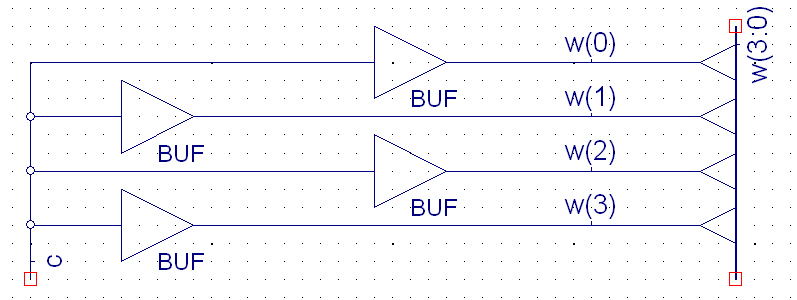
Because we cannot change wire name by bus tap, we use buffer BUF to connect two nets with different names. BUF has one single input and one single output, the output value always equals the input value. The following figure shows an example to let a single control signal drive the wires in a bus.
How to create a bus from a wire?
Xilinx tool let you create multiple instances of wire or element in a bundle. First let's create a bus from a single wire. Add a wire to the canvas:

Add the wire name w(4:0). you will see that the single wire becomes to a bus.

We can also create a bundle of elements. Add a BUF to the canvas:

Double click on the BUF, change the InstName to buf_in(4:0).

Then you will see that the single buffer becomes to multiple instances.

Finally you can add a bus at the output, and name it as v(4:0).


