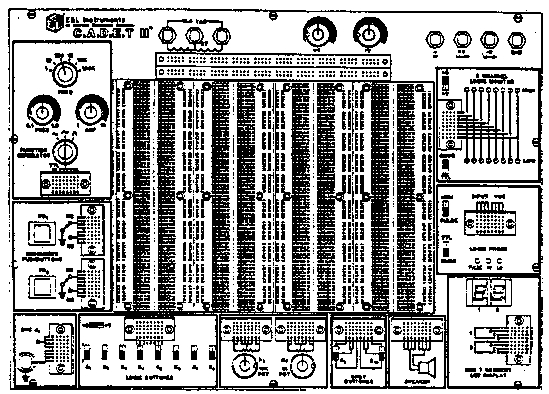
In order to properly use the full capabilities of the C.A.D.E.T. II
it is highly recommended that the user become familiar with the panel layout
and the features of the components. (see Figure 1 below)
FIGURE 1. C.A.D.E.T. II Front Panel Layout
By combining the three DC power supplies on the C.A.D.E.T. II the user
may work with virtually any type of integrated circuit or discrete component.
The fixed 5V supply has become an industry standard for powering digital
IC's. IC's which require +5V, +12V, and 5V are easily accommodated
by the C.A.D.E.T. II. The variable supply output voltages may be changed
by using the adjustment knobs on the front panel. The positive and negative
outputs are continuously variable from +1.3 to +15V and 1.3 to 15V
respectively. Both variable supply outputs are referenced to circuit common.
This creates a split supply which is often used with differential and operational
amplifiers (opamps).
In addition to the DC power supplies, the C.A.D.E.T. II also provides a 12.6 volt centertapped AC supply. This allows the user to construct any of halfwave and fullwave rectified power supplies on the breadboarding area and apply power by simply connecting jumper wires to the three AC supply output pins.
The multiwaveform function generator provides continuously variable frequency signals from 0.1Hz (for extralow frequency work) to radio frequeng signals of 100Hz. The frequency is selected in six decade ranges, with a vernier to adjust frequency within each range. The sine wave output is factory adjusted for rnirumum distortion. The triangle waveform is adjusted for best linearity. The standard square wave and TTL level outputs are both set at a 50% duty cycle. The TTL output, capable of driving up to 10 TTL loads, is continuously available and in phase with the square wave output. The low output Impedance of the sine, square, and triangle waveforms (600 ohms) assures maximum coupling of the output signal to the device being driven. All outputs can withstand a continuous short circuit to ground.
Sixteen LED's, eight red and eight green, make up eight Logic Indicators that will display logic high and low conditions based on either TTL or CMOS thresholds, selectable by the user. Operating voltage can also be selected by the user to be either at +5V, or at the setting of the +1.3 to +15V supply. This selection should be the same as the operating circuitry that is to be monitored. The red LED's will light when the voltages at the inputs ate 2.2 volts or higher when in the TTL position, or 70% of the operating voltage or higher when in the CMOS position. The green LED's will light when the voltages at the inputs are 0.8 volts or less when in the TTL position, or 30% of the operating voltage or less when in the CMOS position. An unconnected input, or an input not at valid logic level, will cause both LED's to be extinguished. Note that the thresholds determined by the TTL positions are only accurate when the +5V range is selected. The 100K ohm input impedance ensures minimal loading effects of the circuit under test.
The C.A.D.E.T. II uses clocked flipflops to provide debounced pushbutton switch functions. The pushbutton circuitry has opencollector outputs switch can sink up to 250rnA each. This type of debouncing gives the user a sharp, glitchfree trigger source which assures reliable operation in digital circuits. Each pushbutton has a normallyopen and a normallyclosed output. If necessary, a pullup resistor can connect any pulser output to any of the positive voltage sources.
Two potentiometers are provided on the C.A.D.E.T. II. The resistance values chosen (1K and 10K ohms) may be used in common circuit applications such as volume controls. All leads for both potentiometers are available and uncommitted.
The C.A.D.E.T. II may be connected to other pieces of equipment via a BNC connector. This allows the use of shielded cable to minimize noise and interference.
Two single pole, double throw (SPDT) switches are provided for general
switching functions. All leads are available and clearly marked on the
C.A.D.E.T. II for easy connection. Eight switches are configured as Logic
Switches to provide a convenient source of digital outputs. These switches
w ill provide logic levels of zero volts (ground) for a logic low, and
logic high levels of either +5V or the voltage setting of the +1.3 to +1SV
supply. The high level is determined by the setting of the +5/+V switch.
This arrangement makes connecting special digital circuitry such as an
8bit input port quick and easy, and allows compatibility with virtually
any logic family.
CAUTION
Integrated circuits can be destroyed if a voltage is applied to their inputs that is higher than the operating voltage of the IC's. Always insure that the setting of the +5/+V high-level switch is in the correct position before making connections to any device.
CHECKING OUT THE C.A.D.E.T. II
The C.A.D.E.T. II may be checked out for proper operation by connecting
the AC line cord to a suitable receptacle. The two 7segment displays
should light when the power switch is fumed on.
Using a DC voltmeter, check for +5 volts between the ground terminal
and the +5V terminal. Repeat the measurement for the positive (+) variable
supply terminal and the negative () variable supply terminal. Check
the variability of each supply by turning the appropriate adjusting knob.
To test the logic indicators, switch the +5/+V operating voltage switch
to the +5 position. The TTL/CMOS threshold switch can be in either position.
With no input to the logic indicators, all LEDs should be fumed off. Connect
one end of a jumper wire to the +5 volts terminal and the other end to
logic indicator 1; the red LED of logic indicator 1 should light. Repeat
this test for logic indicators 2 through 8. Disconnect the jumper from
the +5 volt terminal and connect it to the ground terminal. Connect the
other end to logic indicator 1; the green LED of logic indicator 1 should
light. Repeat this test for logic indicators 2 through 8.
The function generator may be tested by connecting its output to one
of the speaker inputs. Connect the other speaker input to one of the ground
terminal. Switch the function generator range switch to 1KHz. Turn the
frequency control pot clockwise. Move the amplitude control clockwise until
you hear a tone coming from the speaker. Switch the waveform selector to
select sine, square, and triangle. A changing but clearly audible tone
should be heard in each position of the frequency control should vary the
pitch of the tone.
If an oscilloscope is available, you may check the function generator
for proper waveform and frequency using standard measurement techniques.
The debounced pushbuttons can be checked by connecting one side
of a resistor (20 ohms, to 100K) to ~ 5 volts and the other side to PB1,
the NC point. Then connect PB1 to LED1 with the Logic Indicator
+;/+V switch in the +5V position, the red LED should light when PB1 is
pressed and the green LED should light when PB1 is released. Next, move
the connections from PB11 to PB21, the NO point. Now the red
LED should be lit when PB1 is not pressed, and the green LED should be
lit when PB1 is pressed. Repeat these steps to test PB2.
The logic switches can tee tested by connecting the output of logic
switches 1 through 8 to the input of logic indicators 1 through 8. Switch
the logic switch +5V/+V operating voltage switch to +5, and switch the
logic indicator +5/+v operating voltage switch to +5. Select the CMOS position
on the logic indicator m/CMOS threshold select switch. Now the logic indicators
should reflect the conditions of the logic switches, that is, red LEDs
win indicate switches in Me high (logic "1") position and green
LEDs will indicate switches in the low (logic "0") position.
Move each switch between its high and low position to verify proper functioning.
Switch the logic +5/+V high level switch to +V and the logic indicator
+5/+V operating voltage switch to +V; indicator display should remain the
same, regardless of the setting of the 1.3 15 volts +V supply.
By using an ohmmeter, you can check the potentiometers. To do so, select an appropriate range for measuring 10K and connect the ohmmeter leads to R11 and R12. With R1 rotated fully counterclockwise a reading of zero ohms should be observed. As the potentiometer is rotated clockwise, the resistance reading will be seen to increase linearly up to 10K:t20%. Now move the ohmmeter lead from R11 to R13; with R1 fully clockwise the ohmmeter will read zero ohms, and the resistance will increase linearly to Me full value noted previously as the potentiometer is rotated counterclockwise. Select an ohmmeter range appropriate Or 1K and repeat these steps on R2 to verify its function.
To test SPOT switch S9, put S9 in the up position and connect and ohmmeter
to S91 and S92. The ohmmeter should read zero ohms. When the
switch is brought to the down position, an open circuit should be indicated.
Move the ohmmeter lead from S91 to S93 and observe a short circuit
with S9 down, and an open with S9 up. These steps can be repeated on S10
to test its functions.
To test the logic probe, connect a wire from Vcc to +5 terminal. Set
mem/pulse switch to pulse and TTL/CMOS switch to TTL Connect a wire from
input to +V terminal. Connect the multimeter between GND and +V. Turn the
+V pot fully counterclockwise, read approx. 1 2V on the meter. Slowly turn
the ~ V pot until the HI LED lights. Read approx. 2.4V on the meter. Set
pulse/mem. switch to mem. Touch input lead to ground. Observe low LED lighting
and pulse LED lighting and shying on. Move pulse/ mem switch to mem and
observe pulse LED going out. Move TTL/CMOS switch to CMOS. reconnect input
lead to the +V terminal. With the +V pot fully counter clockwise, slowly
turn the +V pot clockwise until the low LED goes out. Read approx. 1.6
volts on the DMM. Continue fuming the +V pot until the HI LED lights read
approx. 3.5 volts on the DMM.
To test the BCD to 7segmentdisplays, jumper together pins 1A, 1B, and
1C. Connect a jumper wit from these points to ground. Connect a second
jumper wire from position 10 to +5V. Observe a number 8 showing on the
display. Repeat this test for display number 2.
This section contains information which may prove useful when constructing
circuits using the C.A.D.E.T. II. While there are no hard and fast rules
for breadboarding, the following tips may save time and trouble.
Unless a circuit is being prepared for a demonstration of display, avoid
cutting component leads very short. While short wires and leads may look
neat, the clipped components will only fit into a limited "span"
of connector sockets, limiting the use of the use component.
It is perfectly permissible to use untrimmed components while exploring
different circuit possibilities. The only time short leads may be necessary
is when operating at higher frequencies and experiencing mysterious malfunctions.
Sometimes the only way to correct a high frequency circuit problem is to
shorten all circuit connections.
Be cautious when using components which have been removed from a tape
reel used in automatic insertion equipment. Suppliers of surplus components
often sell components which are taped together in small batches. Removing
the components from the tape does not always remove the adhesive from the
leads of the components. Placing a formerly taped component into a socket
connector may result in a poor electrical connection and, worse still,
leave tape adhesive in the socket. Avoid this problem by either carefully
cleaning taped component leads, clipping the taped portion of the lead
off, or avoiding the use of taped components altogether.
Be especially careful when inserting integrated circuits into the breadboard
sockets. Unless the IC pins are straight, it is very easy to crush the
pin into a zigzag shape or fold the pins underneath the body of the
IC. Either way the result is a bad connection or no connection at all.
Always use solid wire for breadboard connections. When stripping the
wire ends, be careful not to strip more than about threeeights of
an inch of insulation from the wire. Too much bare wire may result in unintentional
connections near the wire end.
After you have built up a few circuits, you will have a good collection of prestripped jumper wires. Save them. By reusing these wires, you can save even more time and effort in assembling future circuits.