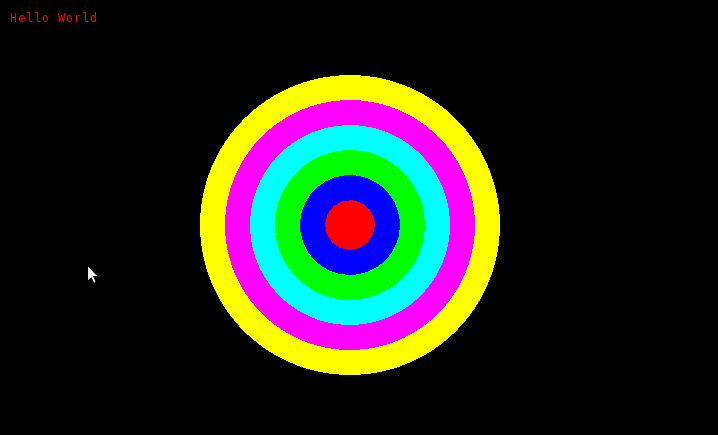
bullseye
It is a bit tricky to get the SOE graphics working. Here’s what I had to do.
$ sudo apt-get install libghc6-opengl-dev
$ sudo apt-get install libxrandr-dev
$ cabal install GLFW
$ wget http://cseweb.ucsd.edu/classes/wi12/cse230-a/static/SOE.tar.gz
$ tar -zxvf SOE.tar.gz
Next, suppose you have a Haskell file called foo.hs with the following source.
> import SOE
>
> makeCircle (x,y) r = ellipse (x-r, y-r) (x+r, y+r)
>
> circles = reverse $ zipWith withColor colors bwcircles
>   where bwcircles = [makeCircle center (25*i) | i <- [1..(length colors)]]
>         colors    = [Red, Blue, Green, Cyan, Magenta, Yellow]
>         center    = (350, 225)
>
> test = runGraphics $ do
>   w <- openWindow "Test" (300,300)
>   drawInWindow w $ text (10,10) "Hello World"
>   sequence_ $ map (drawInWindow w) circles
>   k <- getKey w
>   closeWindow w
To test that your install is working, run the following, which adds the SOE modules to the search path of ghci
$ ghci -i./SOE/src/
You should see something like
GHCi, version 6.12.1: http://www.haskell.org/ghc/  :? for help
Loading package ghc-prim ... linking ... done.
Loading package integer-gmp ... linking ... done.
Loading package base ... linking ... done.
Next, load up the file foo.hs
Prelude> :load foo.hs
[1 of 2] Compiling SOE              ( ../SOE/src/SOE.hs, interpreted )
[2 of 2] Compiling Main             ( hw1.hs, interpreted )
Ok, modules loaded: SOE, Main.
Finally, test the code with the following
*Main> test
Loading package OpenGL-2.2.3.0 ... linking ... done.
Loading package GLFW-0.4.2 ... linking ... done.
Loading package old-locale-1.0.0.2 ... linking ... done.
Loading package old-time-1.0.0.3 ... linking ... done.
You should see a window that looks like this
bullseye
(Hit any key over the window to close it.)