
| February 29 | |
| February 27 |
Due: 11:59pm, March 5
At this point the project you will take full control of your processor design. Your goal is to end up with a working processor that implements you ISA, but the details of that design are completely up to you. This and the following labs will provide you with guidance on how to proceed, but many design decisions will not be spelled out.
Now that you have a validated ISA, it is the time to implement a full processor based on your ISA. In lab 6, you will design and implement the datapath of the whole processor. Specifically, you need to 1) revise your fetch unit, 2) identify and implement major components of the backend datapath, 3) design and implement a complete datapath of your processor. You will draw a datapath schematic of the whole processor and implement it in structural Verilog. Once the datapath is completed, you will complete the processor by adding control logic in the next lab, and then evaluate its performance against various benchmarks.
You were given a datapath design for the frontend (fetch unit) in lab 2. In lab 6, you will design the datapath of you processor by yourself. Basically, your processor should be able to support at least four pipeline stages - the front end is three stages, and the back end is another. However, your version of pipelining is a little more sophisticated, but also less complex than the 5-stage MIPS pipeline because it has a queue between the two stages to decouple them, rather than just a register. This decoupled design between the frontend and the backend is more common in modern processor designs.
The processor core is the top module of your processor design. It has the following interface:
// D_WIDTH  : data width
// PA_WIDTH : port address width

module core#(parameter D_WIDTH = 34, PA_WIDTH = 4)
(
    input  clk,
    input  reset,

    // I/O interface
    output in_req,
    output out_req,
    output [PA_WIDTH-1 : 0] in_addr,
    output [PA_WIDTH-1 : 0] out_addr,
    input  [D_WIDTH-1 : 0]  in_data,
    output [D_WIDTH-1 : 0]  out_data,
    input  in_ack,
    input  out_ack
);
The core interface is simple - it consists of clk, synchronous reset, and I/O interface. When 'reset' signal transitions from high to low, the processor core starts executing from the 0x0 of the instruction memory. The I/O interface provides the interface for in and out instructions, which communicate to the outside world. Since the available pins are usually very limited, the I/O interface multiplexes 16 channels into one physical channel to save the pincount. All I/O interface signals are edge-triggered.
The I/O interface is similar to a conventional bus interface. 'in' instruction asserts 'in_req' and 'in_addr', then waits for 'in_ack' to become 1. If 'in_ack' arrives, the backend stores 'in_data' into the register the 'in' instruction specifies. In the best case, the 'in_ack' signal will arrive in the next cycle, but it can be arbitrarily delayed if no data is available in the specified channel. In the waveform example below, the core asserts 'in_req' with 'in_addr' to 0xF. The core spends two idle cycles, then it stores 0x123 to the register file when 'in_ack' signal arrives.
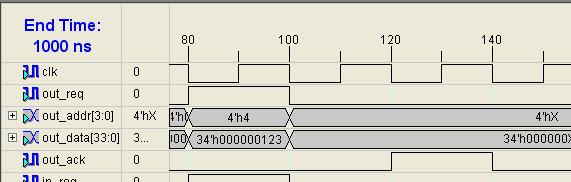
'out' instruction works in a similar way; but the backend also asserts 'out_data' along with 'out_req' and 'out_addr'. After asserting a request, the backend waits for 'out_ack' comes. Like 'in_ack', 'out_ack' could arrive after an arbitrarily long delay, signaling the completion of a request. In the waveform example below, the core asserts 'out_req' with 'out_addr' to 0xF and 'out_data' to 0x123, then waits for 'out_ack' comes. When 'out_ack' signal is asserted after one cycle, the core completes out instruction.
You already have a baseline frontend implementation, which allows the fetch unit to work independently of the backend. However, you may find that you need to modify existing fetch unit so that it can be well matched to your ISA.
Q1. Review your fetch unit and update it if you need to. For each change you made, explain the reason in your hardcopy report. If you think your processor is fine with the existing fetch unit, you do not need to make any change.
You will design and implement the datapath of the backend in this lab. Toward the goal, you need to identify major components of the backend first. The backend is likely to contain the following components:
A register file is essential to store register data of your processor. It should support read and write operations simultaneously, and have an interface along the following lines. (You may need to add more read/write ports depending on the needs of your ISA)
  // SEL_WIDTH : number of bits needed to specify a register
  // D_WIDTH : data width

  module regfile#(parameter SEL_WIDTH = 4, D_WIDTH = 34)
  (
	  input  clk,
	  input  we,
	  input  [SEL_WIDTH-1 : 0]  read_sel0,
	  input  [SEL_WIDTH-1 : 0]  read_sel1,
	  input  [SEL_WIDTH-1 : 0]  write_sel,
	  input  [D_WIDTH-1 : 0]    din,
	  output [D_WIDTH-1 : 0]    dout0,
	  output [D_WIDTH-1 : 0]    dout1,
  );

Note that writing a value to a register occurs at the clock edge, while reading a register does not involve any clock edge. In other words, 'we', 'write_sel', and 'dout' are edge-triggered, while 'read_sel0', 'read_sel1', 'dout0', 'dout1' are level-triggered as you see in the figure above (read_sel0 and read_sel1 don't go into the pink register). For example, if you assert 'we (write enable)' signal before the clock edge in a certain clock cycle with 'write_sel', 'din' will be stored in the specified register at the rising edge of the next clock. In contrast, if you change 'read_sel0' or 'read_sel1', 'dout0' or 'dout1' will be changed in the same clock cycle. Examine how a register file behaves in the following waveform. Note that the written value is updated at the clock edge, while 'dout0' and 'dout1' changes instantly when 'read_sel0' or 'read_sel1' changes. You can implement your register file using flip-flops.

Your processor has two memory modules - an instruction memory and a data memory. While the instruction memory is a part of the fetch unit, the data memory is located in the backend. You should use the provided wrapper module for the data memory. Like the register file, it allows read and write operations, however it does not support simultaneous read and write in a clock cycle. In one cycle, the data memory can serve either a read operation or a write operation.
Memory module wrapper : Note that reset signal is added to the interface. Generate a data memory module dmem_34_8k.v, and use it via the wrapper. Sometimes the wrapper module will assert refused signal, and your processor should be able to tolerate it. You are not allowed to change the provided wrapper.
   module dmem#(parameter A_WIDTH = 13, D_WIDTH = 34)
  (
          input  reset,
	  input  clk,
	  input  read_write_req,
	  input  write_en,
	  input  [A_WIDTH-1 : 0] addr,
	  input  [D_WIDTH-1 : 0] din,
	  output [D_WIDTH-1 : 0] dout,
	  output refused
  );
Data memory interface is straightforward. All the signals of the data memory module are edge-triggered, and you can assert the following signals for read and write operations.
'read_write_req' <= 1, 'write_en' <= 0
on the next cycle, refused or dout will be set. if refused is set, you will need to wait more cycles.
'read_write_req' <= 1, 'write_en' < = 1, 'din' <= 34-bit data to writ
if not refused, the 34-bit data will be written to the specified location of the memory in the next clock cycle.
Then, why do we need 'refused' signal? 'refused' signal indicates that the memory module cannot service the requested operation at that time. There are a few reasons for the asserted 'refused' signal; the memory could be being refreshed; or another processor core has already been using the memory in the multi-core system. Although 'refused' signal is not used in this lab, your backend must be able to tolerate the 'refused' signal; if 'refused' is asserted upon a memory request, the backend should request the same operation until it succeeds.

In the waveform above, the core requests one write operation and one read operation. Unfortunately, the data memory cannot service the read operation, asserting 'refused' signal. Upon the 'refused' signal, the core requests the same operation in the next clock and successfully get the memory value in the second trial.
In addition to the register file and memory module, you would need other components in the datapath of the backend. In the case of the fetch unit, you used a few adders, a sign extender, and a few muxes to get the updated PC. For the backend, it depends on your ISA and how you implement it. For instance, you will need to design an ALU that can perform the operations that your ISA supplies.
Q2. List all the other leaf modules needed for the backend of your processor. For each module, list all the instructions that use the module.
The backend of your processor should use something along the lines of the following interface. The specifics of your interface will depend on whether you have made any changes to the fetch unit.
// I_WIDTH  : isntruction width
// IA_WIDTH : instruction address width
// D_WIDTH  : data width
// PA_WIDTH : port address width

module backend#(parameter I_WIDTH = 17, IA_WIDTH = 12, D_WIDTH = 34, PA_WIDTH = 4)
(
    input  clk,
    input  reset,

    // inputs from the fetch unit
    input  [I_WIDTH-1 : 0]  instruction_data,
    input  [IA_WIDTH-1 : 0] instruction_addr,
    input  instruction_valid,
    input  [I_WIDTH-1 : 0]  load_data,
    input  load_data_valid,

    // outputs to the fetch unit
    output deque,
    output restart,
    output [IA_WIDTH-1 : 0] restart_addr,
    output load_store_valid,
    output store_en,
    output [IA_WIDTH-1 : 0] load_store_addr,
    output [I_WIDTH-1 : 0]  store_data,

    // I/O interface
    output in_req,
    output out_req,
    output [PA_WIDTH-1 : 0] in_addr,
    output [PA_WIDTH-1 : 0] out_addr,
    input  [D_WIDTH-1 : 0]  in_data,
    output [D_WIDTH-1 : 0]  out_data,
    input  in_ack,
    input  out_ack
);
Roughly the interface of the backend consists of two parts - the fetch unit interface and the I/O interface. Both interfaces are already explained before.
Now that you have identified all the major components needed for the backend datapath, the next step is to design a datapath consisting of those modules you have identified. Make sure that your datapath can handle all the instructions of your ISA. Here are a few questions regarding your datapath.
For Q4 and Q5, answer questions with the style used in the following example.
Question: what happens when 'restart' and 'restart_addr' is asserted? assume that 'load_store_valid' is not asserted.
Answer: Assume that 'restart' and 'restart_addr' are asserted in cycle 0.
Before you continue beyond this point, you should understand, in detail how every instruction in your ISA is going to work in the data path. You should have a drawing of your datapath with all the datapath elements and signals labeled and all control lines present. You should also reason carefully about anomolous conditions will be handled (e.g., How will your processor block on 'in' and 'out' instructions? What will happen when memory requests are refused?). Ideally, from this point forward, there should only be implementing not designing.
To help you get to this point you must do two things:
Q6. What questions did your reviewers ask? What bugs did they uncover? Include the names of the members of the other team.
Q7. Provide one example of simulating a short instruction sequence.
Now that you have the datapath design, let's start implementing the datapath. You need to implement 1) major components of the backend such as a register file and a data memory, 2) a backend consisting of various leaf modules, and 3) a processor core consisting of a frontend and a backend. As you did in lab 1, you can use RTL Verilog for the implementation of leaf modules. However, you must use structural Verilog for the implementation of the backend and the processor core.
Q8. Implement a register file module for the backend of your processor in RTL Verilog, and name the file regfile.v. Include the full source file in your hardcopy report.
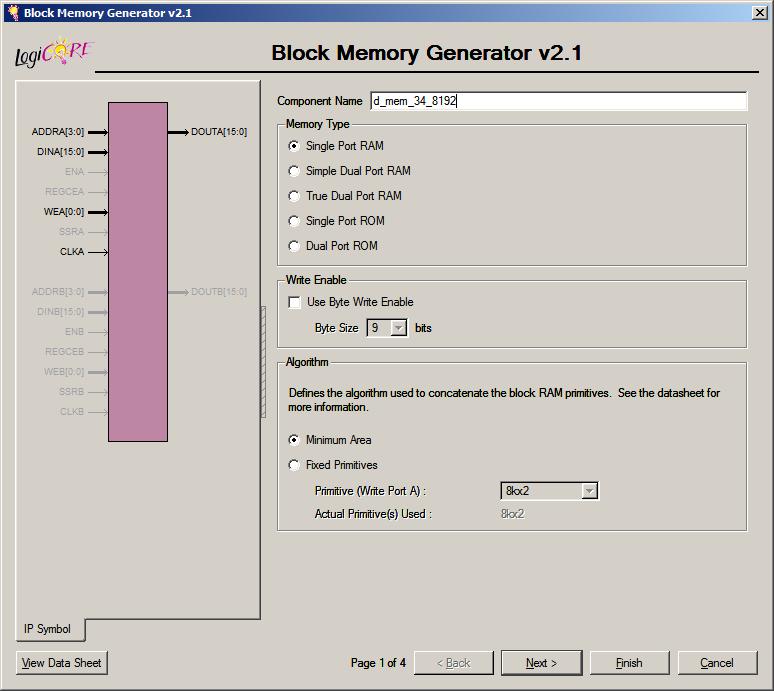
Q9. Unlike for the register file, it is better to use a highly optimized memory generator for the data memory module rather than writing your own data memory module. Fortunately, Xilinx provides a utility named CORE Generator for such a purpose. Gererate a 8K word size data memory module named 'dmem_34_8k' with CORE Generator. You can follow a step-by-step tutorial at the end of this page to do it. For the initialization of the memory module, use any coe file you generated in lab 2b. Write a testbench which tests whether your memory module is working correctly, and then actually test your memory module. Capture the behavioral simulation result screen and include it in your hardcopy report with explanation. The captured screen should clearly show 1) read and write operations work correctly, and 2) memory is properly initialized with the provided *.coe file. The generated module should be used with the provided wrapper module dmem.v.
Q10. Implement all the other modules required in your datapath. You have to implement each module in a separate .v file with RTL Verilog as you did for modules like adders, muxes, and sign extenders in lab 2. You might find that you can reuse many leaf modules used in the fetch unit. Also include full Verilog source code in your hardcopy report.
Q11. Implement 'backend.v' in structural Verilog for the backend of the processor. You can skip control logic in lab 6. Since it is hard to test an implementation without control logic, it is enough to show that your Verilog file is synthesizable and implementable. You will complete the implementation with control logic in lab 7.
Q12. Implement 'core.v' for the top module of the your design. You can simply wire up the fetch unit and the backend. No control logic required for 'core.v'.
With the following steps, you can generate a customized data memory module. In lab 7, you would be able to make a customized instruction memory module by slightly changing the configuration.




| Deliverable |
|
Due: 11:59pm, March 5 |
