cse141L
Lab
3:
Fetch Unit - Control
Changelog
| January 19 |
Reminder: Lab 2 is to be completed in groups of two. Select your
partner wisely. I'm very hesitant to allow changes to group membership
once they have formed. You and your partner should submit a single
write up, etc. etc.
|
Due: February 1
Overview
In Lab 3, you will complete the fetch unit you worked on in Lab 2. Although you
have implemented a datapath for the fetch unit, the design is incomplete
without control logic. In this lab you will also validate your implementation
against given test benches, and find its achievable cycle time.
Support the New FIFO Wrapper
How to use the new FIFO wrapper
In lab 3, a new FIFO wrapper is provided to more clearly convey the FIFO semantics covered in the lecture, and to provide portability between different types of FPGAs. To use the new FIFO module, follow the instructions below.
- Download fifo.v, and put it in your project directory.
- Change the FIFO instantiation in your fetch.v file as follows. Since the new module 'fifo' internally uses the old module 'fifo_27_16', you should keep old fifo related files in your project directory.
replace:
// old fifo instantiation
fifo_27_16 fifo
(
    .clk(clk),
    .din({pc_prev_r, ram_data}), // Bus [26 : 0]
    .rd_en(deque),
    .srst(fifo_reset),
    .wr_en(fifo_enque),
    .dout({instruction_addr, instruction_data}), // Bus [26 : 0]
    .empty(fifo_empty),
    .full(fifo_full),
    .valid(fifo_valid)
);
with:
// new fifo instantiation
fifo fetch_fifo
(
    .clk(clk),
    .din({pc_prev_r, ram_data}), // Bus [26 : 0]
    .deque(deque),
    .clear(fifo_clear),
    .enque(fifo_enque),
    .dout({instruction_addr, instruction_data}), // Bus [26 : 0]
    .empty(fifo_empty),
    .full(fifo_full),
    .valid(fifo_valid)
);
Semantics of the FIFO Wrappers
- If there are any available items in the FIFO, 'valid' is 1; other wise, 'valid' is 0.
- To remove the current item in the FIFO, assert 'deque' signal. On the
next cycle, the 'dout' port of the fifo will have the next item in the FIFO if
one is available. If the 'deque' signal is not asserted, the current element
(if the FIFO is not empty) remains in the fifo. If there are no more items in
the FIFO, 'valid' signal will go to 0.
- If you assert 'clear', 'enque', or 'deque' signal, then the 'full',
'empty', and 'valid' signals would be updated at the beginning of the next
clock cycle.
Fetch Unit Control Implementation
Complete your design using the datapath you implemented in lab 2. For a
description of each signal, refer to the following subsections. You will be
validating your implementation along the way you answer questions below. Keep
your verilog as clean as possible. Naming convention, proper indentation, and
style will be graded (10p). Make sure your verilog file is readable in the
Xilinx ISE editor.
Feel free to change internal control signals. For example, you can switch inputs for 2-input muxes.
Input Signals
- restart:
- 0: normal execution
- 1: restart from restart_addr
- load_store_valid:
- 0: no load or store operation
- 1: load or store operation
- store_en:
Internal Control Signals
These are the signals that the control unit uses for communication with the datapath.
For sel_mux[3:0], you can freely change the assigned signals if you think it would be helpful. Since they are internal control signals, it does not affect the interface of the fetch unit.
- sel_mux[0]:
- 0: branch target address
- 1: next instruction in the memory
- sel_mux[1]:
- 0: previously used PC
- 1: output of mux0
- sel_mux[2]:
- 0: restart address
- 1: output of mux1
- sel_mux[3]:
- 0: output of mux2
- 1: target address for a load or store operation
- ram_we:
- 0: read data from the SRAM
- 1: write data to the SRAM
- fifo_enque:
- 0: no effect
- 1: insert a new item to the FIFO
- fifo_clear:
- 0: no effect
- 1: discard all the entries in the FIFO
Output Signals
- instruction_valid:
- 0: instruction_addr and instruction_data are invalid
- 1: instruction_addr and instruction_data are valid
- load_data_valid:
- 0: load_data is invalid
- 1: load_data is valid
Test Benches
You will use provided test benches to validate your fetch unit implementation. The provided test benches are made with the following assumptions.
- Your fetch uses the given module interface.
- The fetch unit operates at 50MHz.
- Each memory location of the SRAM is pre-initialized to contain its own address as lab 2. For example, the initial data stored in the address 0x1 is 17'b1.
For Q1~Q4 below, you need to do the following things.
- Examine the given test bench, especially the time period specified in the question.
- Deliberate on the correct behavior of the fetch unit.
- Answer questions.
- Include relevant capture screens of the post-route simulation.
It is fine to include only 'interesting parts' of the simulation in your report. However, make sure that your simulation results are clearly shown and all the relevant signals are included in the capture screen. Your answers will be judged according to the degree with which they are both complete and concise.
Preparation
- Download testbench.zip, and unzip it into your project directory.
- Add *.tbw files to your project.
- Perform post-route simulations for each testbench.
test.tfw
- Q1. (10p) reset(200ns ~ 400ns)
- How many cycles does it take the output port 'instruction_valid' to change after 'restart' is asserted? Explain with your screen capture.
- What is the max number of instructions the backend can retrieve by 450ns? What is the min number?
- Q2. (10p) load and store operations (450ns ~ 650ns)
- How many load and store operations are executed in that period?
- How many cycles does it take the output port 'load_data_valid' to change after a load operation is asserted? Explain with your screen capture.
- Does load or store operation interrupt the transfer of instructions to the backend in the test bench? Why?
branch.tfw
branch.tfw simulates the execution of the following program.
addr  instruction
#0    nonbranch_op0
#1    nonbranch_op1
#2    conditional branch to #7(predicted taken)
#3    nonbranch_op3
#4    nonbranch_op4
#5    nonbranch_op5
#6    nonbranch_op6
#7    jump to #0
- Q3. (20p) branch misprediction recovery (400ns ~ 600ns)
- How many 'conditional' branches were executed in the whole test bench? What is the accuracy of the branch prediction?
- Explain how a branch misprediction is recovered in the fetch unit with your capture screen.
Write Your Own Test Bench
Now it is time to write your own test bench. Make a test bench which simulates the case when 'restart' and 'load_store_valid' signals are simultaneously asserted while the FIFO is full. Assume that the 'deque' signal is asserted 2 cycles after 'restart' and 'load_store_valid' are asserted. Make sure to set the timing configuration as the figure below. To meet the setup time requirement, you should assert inputs at negative(falling) egdes. Although your fetch unit will be graded against TA's test bench, please submit your test bench files(*.tfw, *.tbw) with other verilog files. The correctness of your fetch unit against TA's test bench will be graded. (10p)
- Q4. (10p) Describe your test bench scenario.
- Q5. (10p) Explain your simulation result with a screen capture.

Performance Evaluation
Now that you have tested operations of your fetch unit, it is time to evaluate its performance. As you did in lab 2, you will use the static timing report generated by Xilinx ISE. To generate a detailed report, you should change the static timing report properties as follows. First, launch 'Process Properties' window by selecting 'Properties' menu on the 'Generate Post-Place and Route Static Timing' item.
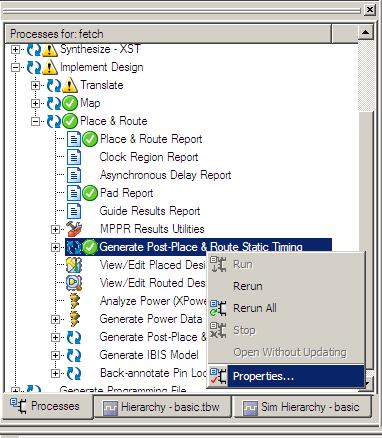
Set 'Report Type' as 'Verbose Report' and 'Perform Advanced Analysis' to on. You can see much more detailed static timing report with this setting.

- Q6. (20p) 'Implement' your design, and skim through the generated static timing report. What is the maximum achievable frequency? Critical path is the path that has the longest delay. In other words, if you can reduce the delay of the critical path, you can increase the operating frequency of the design. Describe the critical path of your fetch unit.(ex. load_store_addr_r -> mux3 -> sram.addr) If the branch prediction is perfect, what is the max number of instructions your fetch unit transfers to the backend in 1 second?

Hints
- To check the sanity of your fetch unit, watch the sequence of 'instruction_addr', 'instruction_data', and 'instruction_valid'. Is it what you expect from a normal processor? If not, there must be something wrong.
- Before diving into postroute simulations, first check your design with behavioral simulations. It takes significantly less time.
- In the simulation, the default is not to monitor internal signals, but you have the option to add them. As shown in the side figure, you can browse the design hierarchy in the 'UUT' item and add signals to the waveform viewer. When you add a signal, however, you should perform the simulation again.
Note that you might not be able to watch internal signals in post-route simulations. This is another reason that you should start with behavioral simulations.
- For those who are more interested in test bench, read this Verilog Test Bench Primer. You can use '$monitor' or '$display' in your *.tfw file to track how a signal changes over time. For example, if you put '$monitor' command in your *.tfw file as the following example, the behavioral simulator will show how sel_mux[3:0] changes.
In *.tfw file,

     .......
     fetch UUT (
        .clk(clk),
        .deque(deque),
        .restart(restart),
        .restart_addr(restart_addr),
        .load_store_valid(load_store_valid),
        .store_en(store_en),
        .load_store_addr(load_store_addr),
        .store_data(store_data),
        .load_data(load_data),
        .load_data_valid(load_data_valid),
        .instruction_data(instruction_data),
        .instruction_addr(instruction_addr),
        .instruction_valid(instruction_valid));

    initial begin
        $monitor($time, " sel_mux[3:0] = 4'b%b", UUT.sel_mux);
        // -------------  Current Time:  150ns
        #150;
        restart = 1'b1;
        // -------------------------------------
        // -------------  Current Time:  160ns
        #10;
    .........
Sometimes Xilinx ISE shows strange results in the postroute simulation. In this case, start a new project, and perform simulations again.
| Deliverable |
- No lab interview is required for lab 3.
- You and your partner should submit your source files (*.v, *.tbw, *tfw zipped) via
e-mail to TA before the beginning of the class. Your email title should be
"[CSE141L] lab 3, SID, your_name your_partners_name".
- Also submit your hardcopy report to TA at the beginning of the class. Please include your full source code in the report
|
Due: February 1 |