How to use Busses and Clocks in Xilinx 6.3
In this tutorial, you will learn how to use busses and clocks. Busses are basically bundles of wires. Why use a bus when you can just wire everything individually? Busses clean up your schematic making it easier to read for someone else. They also make your life easier when simulating/debugging as you'll soon find out. To demonstrate this, we will construct a circuit that takes the AND of four inputs (for argument's sake we'll assume they're related somehow even though they're not really..) and stores the result of this in a flip flop on every rising edge of the clock.
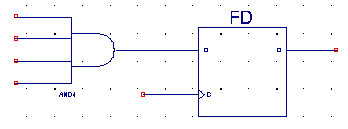
To start, put together something resembling the following schematic:
Now to construct a bus, you want
to bundle these single wires into a bus. To tell Xilinx that you want a single
wire to be part of a bus, you need to use something called a bus tap. To add
this, select the bus tap icon
 . It's next to the
input/output pin icon. Then connect the wire that's sticking out of the bus tap
into a single wire. The flat side will later be the bus side. Change the
orientation using the menu on the left, if necessary.
. It's next to the
input/output pin icon. Then connect the wire that's sticking out of the bus tap
into a single wire. The flat side will later be the bus side. Change the
orientation using the menu on the left, if necessary.
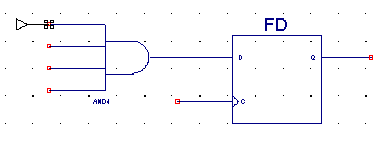
Add some more bus taps and wires:

Now to create the bus, we basically need to name the wire using the Xilinx bus naming conventions. This is usually in the format of Name(number of wires-1:0). There are some other rules you can find in online documentation but as long as you don't get too crazy with it, you'll be fine.
Because we're so creative, let's
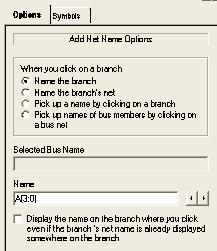
call our bus A(3:0). To do so, we select the name net icon
 . Naming a net
basically means putting a label on a wire. Enter A(3:0) in the Name field
. Naming a net
basically means putting a label on a wire. Enter A(3:0) in the Name field
And click on the bus wire so it looks like this:

Notice that the wire is now thicker, implying that it is a bus wire and not a normal wire. Now we need to name the other side so Xilinx knows how to break down the bus into individual components. You could manually do this by naming a net for each wire, but since we're lazy we're going to use the power of Xilinx to help us do this part. Select "Pick up names of bus members by clicking on a bus net" from the Add Net Name Options window on the left.

Now click on the thick bus wire to grab the bus. The bus is now selected. The name of the current wire to name is displayed in the Name window. Click the "Decrement the name" from the Alter Naming menu and start naming your wires by clicking on them. When you're done it should look like this.

Now add in your pins and label them.

Note a few things. First of all, the FD clock input has been labeled "clk." We will later tell Xilinx that this is our clock signal but for now we label it so we don't get confused. You could call the signal anything you want but using "clk" or "c" is the generally accepted convention. Also, notice that we have put the clock input pin in the top left and labeled it using a net name rather than connecting the pin directly into the flip flop. It is in the top left so when someone looks at our schematic they can easily see what input pins we're using (imaging if you had 30+ pins in your design). Additionally, if we're designing something bigger with many sequential circuit blocks, we'll want to use our clock all over the place. Using this net naming technique keeps things clean so we don't have wires running all over the place.
Save your schematic and generate a test bench waveform to test this circuit. Now we pay more attention to the Initialize Timing screen than we used to.

Observe that we have a few options available to us. We can set clock options on the left and most importantly, we can specify which signal we want to use as clock. In this case it has set it correctly for us, but definitely make sure you check this. You may want to increase the input setup time if you want to make the little blue boxes bigger for clicking on, but remember you can't set this too high. If you don't know why, ask someone. Once you're happy with the setup, go ahead and simulate it with some random numbers.
When you are setting the input values, notice you can now enter a bit "Pattern." You can either enter this in decimal (useful if you're designing an adder..) or in binary if you're feeling a bit edgy.

Now when your friends are talking about keg taps you can tell them all about bus taps. Yay!
Questions/Comments? Contact Kevin (k2li aT cs)