Problem Solving Assignment 4
Due: Thursday of week 8 (5/21/2009) at 11:59pm
With a printed hand in due in class Thurs Week 7
Point total: 25 points
We have seen in lecture and readings how recursion can be useful. When there is a big
problem that needs to be solved, splitting it up into smaller versions of that same problem
until it is at it's simplest case can be a lot quicker and more efficient.
In the first part of this assignment, you will be determining
whether or not a string of characters is a palindrome. A palindrome
is a word, phrase,
number or other sequence of units that can be read the same way in
either direction. Here are some
examples of interesting palindromes. For the purpose of this
assignment, you will not be required to take into account white space
or punctuation, so if you have a phrase that is a palindrome you
should test it without white space or punctuation. For example, if you
wanted to use "A man, a plan, a canal, Panama" you should send your
program "amanaplanacanalpanama". If you want to take on the challenge
and modify your code to accept white space and punctuation, there is
extra credit available if you do it correctly.
You will then write the same function, but this time using
loops. Both code should perform exactly the same. This is so that you
can see for yourself how a problem solvable with a recursive solution can
also be solved with an iterative solution.
The second part of the assignment involves making a modified application of binary search. Modified uses of binary search is one of the most common uses
of recursion you will have in the rest of your studies at UCSD. So this
will help you make your first steps. NOTE: This code has you
(again) reading data from a file. This is a very important skill we want
you to practice, but we also want to make sure you get time to work on the
"recursion part". So we have a deadline of ONE WEEK to complete the
"read from file" part.
The last part of the assignment will be a little more appealing to
the eye and entertaining. It will also involve recursion, but you will
be creating fractals. The graphics have already been written for you
so that you can play with your code and see direct results, but you
will have to write the recursion code that actually draws the
fractals.
This homework requires skills with recursion, 2-D arrays, and loops.
- Palindromes -- This class will allow the user to input any
string, and it will determine if it is a palindrome. It will either
use looping or recursion, based on what the user specifies.
- Dictionary -- This class will read in the contents of a small
dictionary from a file, into a 2-D array. Then it will use a modified
binary search method to allow a user to interactively (from the keyboard)
search the dictionary for a word, and print out the definitions of that word.
- Fractal -- These classes will draw a Dragon Fractal and
a colored Dragon Fractal (EXTRA CREDIT). It
will use recursion and graphics, the main graphics are given to you
through the tester, but there are some that you will have to write that
will be explained below.
Details
You must put a comment at the top of your code that specifies your:
real name, login name, email address, and PID. You must also include a
two-to-four sentence description of the program. Use a multi-line
comment (/* */). YOU MUST DO THIS FOR EVERY JAVA
FILE!
Comments Comments in the style detailed in the book ARE required.
Your code must be properly commented to receive full credit.
Comments and good style are worth (2pt).
Part A - Palindromes (8pts, 3 pts extra credit)
This class will determine whether a string is a palindrome or not using two different methods.
- main() - This is the main method that will
call the other methods to determine if the user has input a palindrome. This
program will take 2 command-line parameters:
- The string in question
- Whether they want loop or recursion to solve the problem
If there are fewer than 2 command-line parameters given, the program
should print the following message, and then exit:
USAGE: java Palindromes (String) (Loop|Recursion)
If there are more than 2 command-line parameters given, the extras will
be ignored and the program continues like normal. Depending on what choice
the user makes (looping or recursion), this method should call the appropriate
method.
The output should look like the following:
> java Palindromes "racecar" Recursion
> This is a palindrome!
> java Palindromes "racecar" Loop
> This is a palindrome!
> java Palindromes "monkey" Recursion
> This is not a palindrome!
> java Palindromes "monkey" Loop
> This is not a palindrome!
NOTE: It should not matter whether the characters are capitalized. For
example, Racecar is a palindrome. Keep in mind though, R != r, so you
might have to modify the input.
(2pts)
- recursivePalindromes(String pal) - This
method will use recursion to determine whether pal is a palindrome or not.
The string
class may be helpful for this assignment. Remeber strings can be used like
arrays, they have a charAt
method that will returns the character at any position in the string, and they
have a substring method that will return a string that is only a portion of
the original string.
The technique you should use in this method is:
-
Base Case: If you reach a string that is either 1 character long or
empty, then the rest of the letters must have matched up, therefore you can
return true.
- Recursive Case:
- Check to see if the first and last letters of the string are equal.
- If they are, send recursivePalindromes the string with those two letters cut
off.
- For example:
recursivePalindromes("racecar")
  if(r==r)
    recursivePalindromes("aceca")
  else
    false
  etc
The return type for this method is a boolean;
true if it is a palindrome
false if it isn't.
(NOTE: Remember that a palindrome
means the first and last letters are the same, the second and second
to last letters are the same, and so on. If a string is zero or one characters
long, it is considered a palindrome.) (4pt)
- loopPalindromes(String pal) - This
method should perform exactly like the recursive method, but should solve the problem using loops.
(2pt)
EXTRA CREDIT:
- White Space - There are many ways to ignore white space, you can either include it in your palindrome methods as you are checking, or you can write a method that removes all of the white space from the phrase to that all that is left is one long string.
(1pt EXTRA CREDIT)
- Punctuation - There are also many ways to ignore
punctuation. You can use whichever method you like, as long as it works. Creating new methods is ok, including it in your already written methods is also ok.
(2pts EXTRA CREDIT)
Part B - Dictionary (10 pts) File read in due in 1 week!
There is one class to this part (Dictionary.java). Overview:
- Read a file (named something like dict.txt or input.txt) and store the
contents into a 2-D array. Sample input
- Loop, interactively asking the user what word they would like to look up in the 2-D dictionary array (until they type DONE in all caps).
- For each word, look up and print out the 4 definitions from the 2-D array OR print "Sorry that word is not in my memory!"
Always Deliverable Design Suggestions:
- Open a file reading the name from the command line
- Read and print each line in the file Print out on paper your code for these two first steps, plus the output of printing out each line in the file, and turn it in in class on Thurs Week 7!
- Modify your read loop to fill in a 2-D array (test by printing out the 2-D array with some loops)
- Write a loop that takes input from a user until they enter the word DONE
- Call binary search in that loop (don't write "the real binary search" yet, just write a method that has the right API (name, parameters, return type) and always returns an index of 0.)
- Write and test binary search.
Details:
- File Input:
Part C - Fractals (5pts, 3pts extra credit)
There are two classes to this part (DragonFractal is required, ColoredDragonFractal is EXTRA CREDIT):
- DragonFractal: This class will draw a Dragon Fractal using recursion. (5pts)
- ColoredDragonFractal: This class will draw a Colored Dragon Fractal (a Dragon Fractal with color changes) using recursion. (EXTRA CREDIT) (3 pts)
The following figure shows recursion depths 1 through 5, and then recursion depth 9, for the the Dragon Fractal.

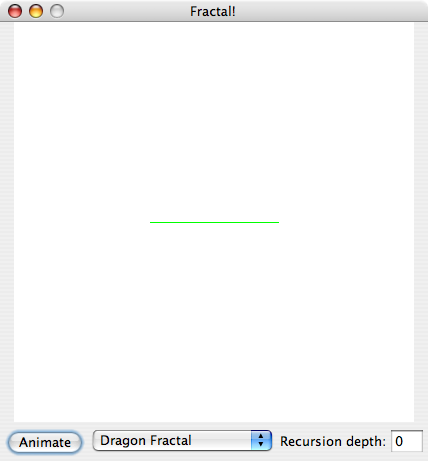
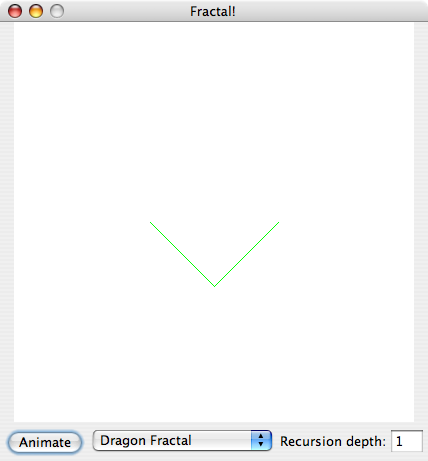
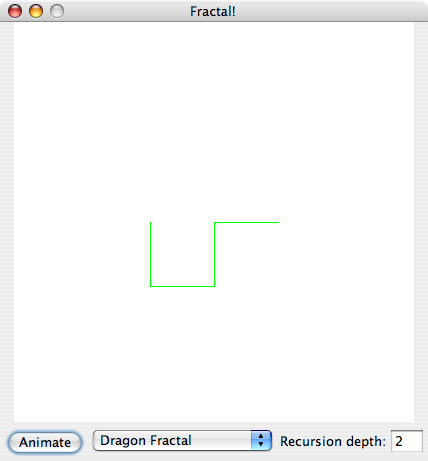
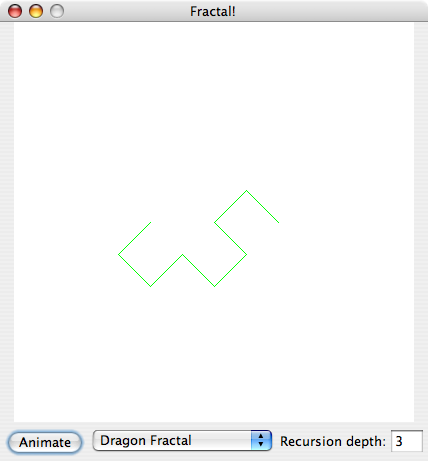
The figures below show what your DragonFractal class should draw for recursion depths 0-3.
|
Depth 0:
|
Depth 1:
|
|
|
|
Depth 2:
|
Depth 3:
|
|
|
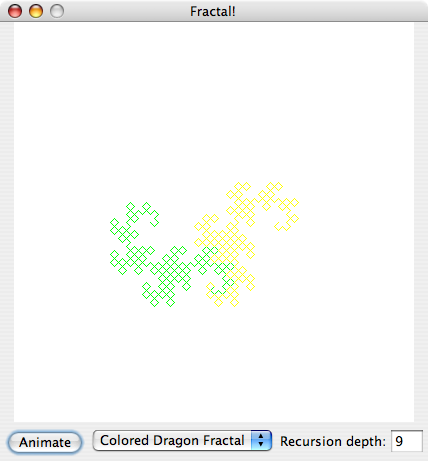
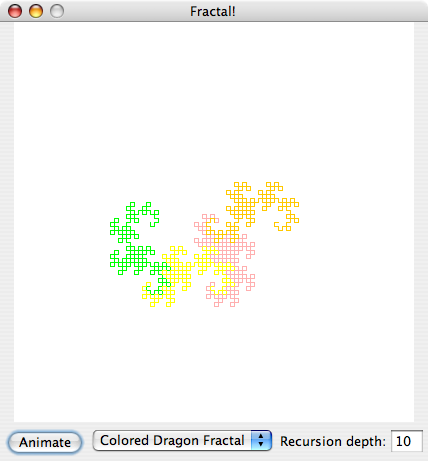
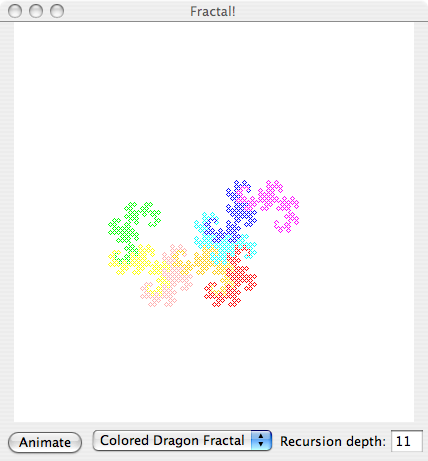
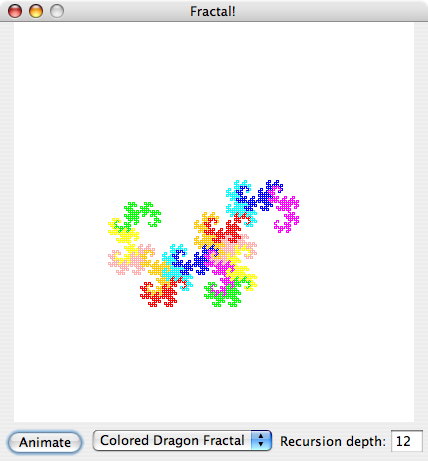
The figures below show what your ColoredDragonFractal class (EXTRA CREDIT) should draw for recursion depths 9-12. (We are starting with depth 9 because when you draw the ColoredDragonFractal with a depth of 8 or less, only one color is used.)
Each colored section is a dragon fractal with depth 8. Note how the different colored sections fit together like tiles, and also note how the number of colored sections increases as the recursion depth increases. Can you see a pattern?
|
Depth 9:
|
Depth 10:
|
|
|
|
Depth 11:
|
Depth 12:
|
|
|
Important methods that will be used:
-
The Animator class has two methods:
sleep(int milliseconds) -- Pauses for the amount
specified. Used so that the process of drawing lines can be seen.
drawLine(Point p1, Point p2) -- Draws a solid
line from point p1 to point p2.
NOTE: You do not need to write the Animator class, but you will need the
source code for it in order to compile your fractals. The source code
for Animator.java can be found here.
-
The Point
class has 3 important parts that will be used in this
assignment:
Class Field - x -- This is the x
coordinate where the point is located in the pane.
Class Field - y -- This is the y coordinate where the
point is located in the pane.
Point(int x, int y)
(constructor) -- This is the constructor that creates a new point at
the x and y coordinates specified.
- NOTE: In each class, java.awt.* needs to
be imported.
DragonFractal (Total 5pts)
-
Animator animator - This field holds the
Animator object that this fractal should use. This field
should be private.
(1/2pt)
- DragonFractal(Animator a) [constructor] - This
constructor sets the instance variable animator to the parameter
a.
(1/2pt)
-
draw(int depth, Point p1, Point p2, String direction) -
The value of depth is the recursion depth. The value of direction will be either "R" (right turn) or "L" (left turn).
- Base Case: If this is a 0-depth Dragon fractal,
then this method should draw a line from p1 to p2 and sleep for 20
milliseconds. Then it should return to the previous iteration.
- Recursive Case: If this is not a 0-depth Dragon fractal,
then this method should make either a left or right turn. If the direction is "R", make a right turn. If the direction is "L", make a left turn.
This method has no return value.
- Right turn
See the above images for a reference to what should be drawn.
First, calculate the x-value and y-value of a new point called newP.
-
The x-value of this new point should be (the sum of
(the sum of the x-values of p1 and p2) and (the difference of the
y-values of p1 and p2)), then that sum divided by two.
- The y-value of this new point should be (the
sum of (the difference of the x-values of p2 and p1)
and (the sum of the y-values of p1 and p2)), then that sum divided by two.
Then make two recursive calls to draw, passing in the decremented value of depth and the following parameters:
- Pass the points p1 and newP to a right turn recursive call
- Pass the points newP and p2 to a left turn recursive call
- Left turn
See the above images for a reference to what should be drawn.
First, calculate the x-value and y-value of a new point called newP.
-
The x-value of this new point should be (the sum of
(the sum of the x-values of p1 and p2) and (the difference of the
y-values of p2 and p1)), then that sum divided by two.
- The y-value of this new point should be (the
sum of (the difference of the x-values of p1 and p2)
and (the sum of the y-values of p1 and p2)), then that sum divided by two.
Then make two recursive calls to draw, passing in the decremented value of depth, the alternate value of direction, and the following parameters:
- Pass the points p1 and newP to a right turn recursive call
- Pass the points newP and p2 to a left turn recursive call
Once the recursive calls have been made, this method should return.
(4pts)
More information about the DragonFractal is here.
ColoredDragonFractal (3pts EXTRA CREDIT)
The Colored Dragon Fractal is drawn in the same shape as the Dragon Fractal, with color changes. You can copy and reuse a lot of code from your DragonFractal class when you create your ColoredDragonFractal class.
If you want to design your own Colored Dragon Fractal that changes colors in an interesting way, we encourage you to do so.
Or you can use the provided instructions to draw the example Colored Dragon Fractal.
Option 1: Design your own Colored Dragon Fractal
If you design your own Colored Dragon Fractal, please include a brief description of how it works and why it is interesting in your comments at the top of the ColoredDragonFractal class (1/2pt for description). The required fields and methods include animator, the ColoredDragonFractal constructor (1/2pt for animator and constructor), and the draw method (see specifications in instructions for option 2 below) (1pt for draw). You can create any other fields and methods that you want to implement the coloring (1pt for coloring).
(3pts)
Option 2: Instructions for drawing the example Colored Dragon Fractal
-
Animator animator - This field holds the
Animator object that this fractal should use. This field
should be private.
- ColoredDragonFractal(Animator a) [constructor] - This
constructor sets the instance variable animator to the parameter
a.
(1/2pt #1 and #2)
-
Color[] colors - This field holds the
Color objects that this fractal should use. The colors will be used to
draw lines. This field should be private.
You should initialize this array
to contain 8 colors of your choosing. The colors you choose should be easy to tell apart at a glance.
(1pt)
-
int colorIndex - This field holds the index into the colors
array of the current color being used to draw lines. This field should be private.
- nextColor - This method gets the next color in colors that should be used to draw lines.
This method should return the next color in colors, using colorIndex. When it reaches the last element in colors, it should wrap around to the beginning.
(1/2pt #4 and #5)
-
draw(int depth, Point p1, Point p2, String direction, Graphics graphics) -
The value of depth is the recursion depth. The value of direction will be either "R" (right turn) or "L" (left turn).
This method has no return value.
- Base Case: If this is a 0-depth Colored Dragon fractal,
then this method should draw a line from p1 to p2 and sleep for 20
milliseconds. Then it should return to the previous iteration.
- Recursive Case: If this is not a 0-depth Dragon fractal,
then this method should make either a left turn or right turn, as described above. You must pass the additional graphics parameter in your recursive calls to draw.
When the recursion depth in draw is a multiple of 8, change the color used to draw lines. (Note that when you draw the fractal with a depth of 8 or less, the color won't change.) Call your nextColor method to choose what color to use next.
- Use this method in the Graphics class:
setColor(Color c) -- Sets this graphics context's current color to the specified color. All subsequent graphics operations using this graphics context use this specified color.
(1pt)
Testing/Grading
We will have a testing program for both Part A and Part B of this assignment.
The testing code for Part A can be copied from here. But please be sure to try any other
test cases that you can think of.
The tester for Part 2 will allow you to write your fractals one at a
time, and you can test them individully without having to write them
all at once. You can run the testing program for Part B by typing the
following commands on ieng6:
testPSA4B {none|DragonFractal.class} {none|ColoredDragonFractal.class}
We've provided some example fractals, the Sierpinski Triangle Fractal and the Koch Snowflake Fractal, in the tester. You can try out these examples to see how the testing program behaves.
So for example, if you have not completed any of your fractal classes yet, you can run the tester to view the examples we've provided:
testPSA4B none none
Here's another example. If you have only completed your DragonFractal and not the extra credit ColoredDragonFractal, then you could test it by typing:
testPSA4B DragonFractal.class none
The tester will load a GUI application that will allow you to run your
fractal at different iteration depths. You should begin testing your
fractal with small iteration depths (i.e. 0, 1, 2) and then once those
are successful, you can work your way up to larger ones.
The larger the iteration depth you give, the longer it will take for
your fractal to run. This time will grow exponentially as you
increase the iteration depth. For the DragonFractal and ColoredDragonFractal, iteration depths beyond 10 will take a long time.
Turning in your homework
On ieng6 somewhere under your home directory you need to make a folder
called PSA4. All of your files for this assignment must go in
this folder.
Due Thursday Week 8
The files you need to turn in are:
- Palindromes.java - Both of your methods and your main should be included.
- Dictionary.java - Your implementation of the Dictionary.
- DragonFractal.java - Your implementation of the Dragon Fractal.
The optional file you may turn in for EXTRA CREDIT is:
- ColoredDragonFractal.java - Your implementation of the Colored Dragon Fractal.
You should put these files into a folder named PSA4, then cd
into that folder and run the command bundlePSA4. If you're not turning in the ColoredDragonFractal.java file for extra credit, then bundle will give you a warning and ask if you want to continue - just answer yes to continue turning in your assignment.
(You will NOT need bookClasses for either part of this assignment)
More on the Dragon Fractal
Here's some help with the geometry of the Dragon fractal. We will walk though a "right turn". Consider the
diagram below:
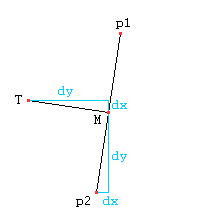
The inputs to this call to the Dragon fractal would be the points
p1 and p2.
The first step is to compute the mid point between p1 and
p2, call it M.
The next useful values to have are the difference in the x-values
of M and p2 (call it dx), and the
difference in the y-values between M and p2 (call it
dy). The values of dx and dy are drawn on
the diagram in blue.
The last point we need to calculate is T, which we can
find using the values of M, dx, and dy.
Notice from the diagram that the difference in x-values between
T and M is equal to dy. Also, the
difference in y-values between T and M is dx.
Now that we have these points, we can make the recursive calls. The
recursive calls you should make are:
- cfractal(p1,T)
- cfractal(T,p2)
NOTE that the order in which you pass the points to the recursive call
makes a BIG difference! Also, only the base case should draw any
lines. The recursive case just makes the recursive calls, and does
nothing else.
(HINT: something you should keep in mind is, will dx be
positive or negative? What about dy? Does it matter? Will your
code work for every case? Hmm...)