CSE 140L Lab 4 ROM Programming Tutorial
In the mini CPU you are going to build, ROM is used as the instruction memory. We have created this module for you. This tutorial will demonstrate how to create a "test program" which consists of a set of instructions you want to execute, and how to feed it into your mini CPU.
Create a Test Program
1. In the main menu, choose File -> New. In the popup window, choose "Other Files" tab, select "Hexadecimal (Intel-Format) File". Click OK.
2. Specify the number of words as 16 (we will have at most 16 instructions) and the word size as 7 (each instruction has 7 bits). Click OK.
3. In the file window, you can fill in the instructions as you want. Note that you are fill in with hexadecimal numbers. Use the example in the lab assignment, the corresponding hexadecimal numbers are:
Address  Inst          Hexadecimal Format
0        000 0000      0
1        001 0001      11
2        010 0010      22
3        100 0000      40
4        011 0000      30
5        010 0100      24
6        110 0000      60
7        111 0011      73
8        000 0000      00
And the screen will appear as:
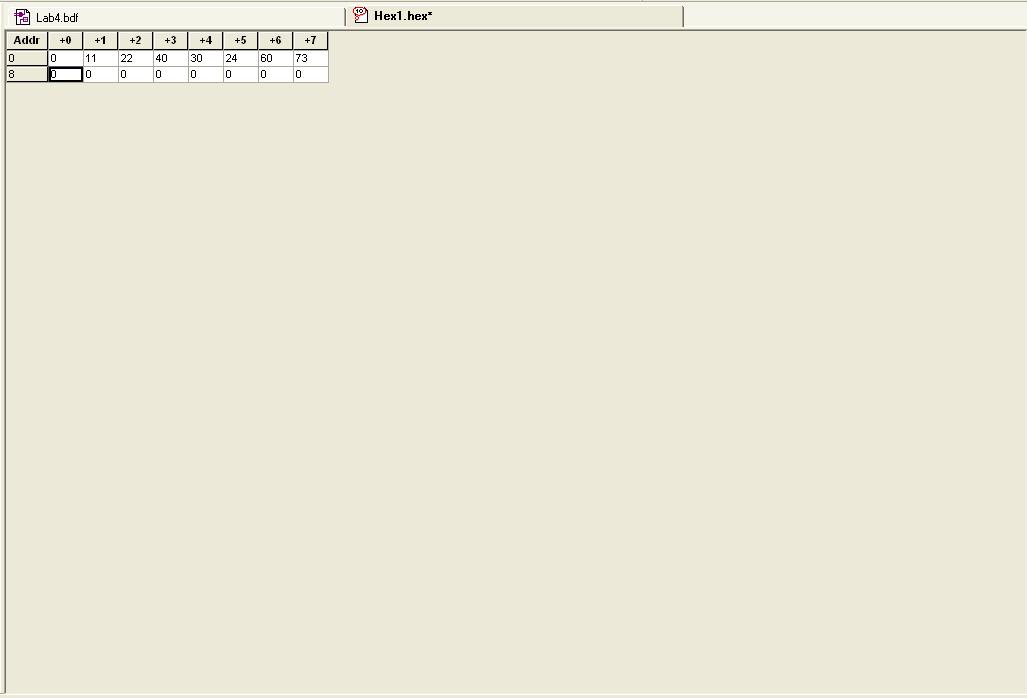
4. Save the file, e.g. "program1.hex". You have created a test program successfully!
Read a Test Program to ROM
To read the test program you just created, choose change file "lpm_rom0.vhd" on line 88, which is "init_file => ...". Put the name of your file (e.g. "program1.hex") replacing the original one and recompile the project.