You are expected to do your own work on all assignments; there are no group projects in this course. You may (and are encouraged to) engage in general discussions with your classmates regarding the assignments, but specific details of a solution, including the solution itself, must always be your own work. All exams are closed book; no implements other than your brain and a writing instrument are to be used.
Incidents which violate the University's rules on integrity of scholarship will be taken seriously. In addition to receiving a zero (0) on the assignment/exam in question, students may also face other penalties, up to and including, expulsion from the University. Should you have any doubts about the moral and/or ethical implications of an activity regarding the course, please see the instructors.
ASSIGNMENT -- The overall objective of this assignment is for you gain some hands-on experience with Prolog and to contrast it with Java. The first 3 questions are simple Prolog questions that require only the most basic Prolog capabilities that were covered in class. In fact, some of these questions can be answered with only a single line of Prolog! Question #4 and #5 require you to write a program in Prolog and then in Java. Question #6 adds to the Prolog program of Question #4. See the bottom of this page for instructions about what to turn in.
COMMENTS -- In Prolog any line that starts with a '%' is considered to be a comment.
To test your predicate use the following facts:
parent(john,max).
parent(mary,john).
parent(mary,jim).
parent(jim,tracy).
parent(tracy,michael).
parent(jim,alan).
Here are a few sample queries showing how your predicates should work:
?- consult('question1.pro').
Yes
?- firstcousin(tracy,max).
Yes
?- firstcousin(X,max).
X = tracy ;
X = alan
Yes
?- firstcousin(tracy,tracy).
No
?- firstcousin(tracy,john).
No
Here are a few sample queries showing how your predicates should work:
?- consult('question2.pro').
Yes
?- first([4,2,5],X).
X = 4
Yes
?- third([4,2,5],X).
X = 5
Yes
?- del3([4,2,5,6],X).
X = [4,2,6]
Yes
Hints:
- Each predicate can be written as a fact (i.e. not a rule), and can thus be written in one (very short) line of Prolog code.
- Remember that in Prolog [A,B|Tail] denotes a list that starts with elements A and B.
Here are a few sample queries showing how your predicate should work:
?- consult('question3.pro').
Yes
?- sum([],X).
X = 0
Yes
?- sum([4,2,5],X).
X = 11
Yes
Hints:
- Use a fact for the base case, and a rule for the recursive case.
b. Write a mean predicate so that mean(X,Y) is true if and only if Y is the arithmetic mean of the element of list X. The predicate should fail if X is not a list. The sum of the elements of the empty list is 0. (Assume that the X list contains only numbers).
Here are a few sample queries showing how your predicate should work:
?- consult('question3.pro').
Yes
?- mean([],X).
X = 0
Yes
?- mean([2,3,7],X).
X = 4
Yes
Hints:
- Use the sum predicate that you defined in a. above.
- Use the myLength predicate that we covered as an example in class.
|
|
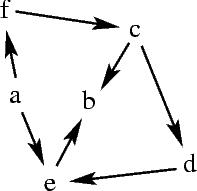
Consider the Directed Acyclic Graph (DAG) on the left. the goal of this assignment is to write a program that will determine whether there is a path from one vertex to another. While this is the graph that you will use for testing, your program should of course work for any directed acyclic graph given as input. Note that if the graph were cyclic, this assignment would be more difficult. |
a. In Prolog, write a path(X,Y) predicate which is true if and only if there is a path between vertex X and vertex Y. The predicate should operate as follows:
?- consult('question4a.pro').
Yes
?- path(f,d).
Yes
?- path(e,c).
No
Hints:
?- consult('question4b.pro').
Yes
?- path(f,d).
f -> c -> d
Yes
?- path(e,c).
No
Hints:
a. Write a Java program that implements the same functionality as the path predicate above.
The Java program must take in input a file that describes the DAG's vertices and edges. This file is necessary because, unlike Prolog, Java does not have a built-in database of facts. The format of the DAG file is as follows: one line per directed edge in the DAG; each line lists the two vertices that are connected by the directed edge, separated by a white space. A sample DAG file for the DAG depicted above is available here. The name of the DAG file should be passed to the Java program as an argument on the command-line.
The Java program asks the user to input the name of a source vertex and the name of a destination vertex, and prints out whether there is a path between the source and the destination. The program should loop forever. Here is a sample execution, assuming that the DAG file name is "dag_file" (user input is shown in red).
% java Driver dag_fileAs for PA #1, we will not be using an automatic output verifier. You program should handle incorrect input as much as possible (use your common sense).
Enter the name of a source vertex: f
Enter the name of a destination vertex: e
There is a path between 'f' and 'e'.
Enter the name of a source vertex: b
Enter the name of a destination vertex: d
There is NO path between 'b' and 'd'.
Enter the name of a source vertex: a
Enter the name of a destination vertex: b
There is a path between 'a' and 'b'.
...
Driver must be the name of the class containing the main method.
Hints:
- You may want to define a DAG class and a Vertex class.
- The StringTokenizer class provides a convenient way to parse a string.
b. [Extra Credit] Modify the Java program above so that it also prints the path between the two vertices. You need only to turn in one program and while grading we will just see if your program prints a (correct) path or not. Here is an example output:
% java Driver dag_file
Enter the name of a source vertex: f
Enter the name of a destination vertex: e
There is a path between 'f' and 'e': f -> c -> d -> e. Enter the name of a source vertex: b
Enter the name of a destination vertex: d
There is NO path between 'b' and 'd'.
Enter the name of a source vertex: a
Enter the name of a destination vertex: b
There is a path between 'a' and 'b': a -> e -> b.
Hints:
- There are several possible ways to do this. One way is to use a Stack.
|
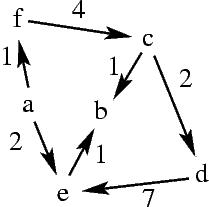
Modify the Prolog program in Question #4 so that it computes the path length. The length is defined as the sum of edge weights along the edges on the path. For instance, on the DAG to the left, the path f -> c -> d -> e has length 4 + 2 + 7 = 13. |
?- consult('question6.pro').
Yes
?- path(f,d,Length).
f -> c -> d
Length = 6
Yes
?- path(e,c,Length).
No
Hints:
You should create a tar ball called <username>_cse130_pa2.tar, where <username> is your account username. The tarball should contain the following:
- A main directory called <username>_cse130_pa2, with 6 subdirectories called question1, question2, question3, question4, question5, and question6.
- Each directory must contain:
- question1: the documented Prolog source code for all three predicates, in a file called "question1.pro" (the file should also contain the basic facts).
- question2: the documented Prolog source code for all three predicates, in a file called "question2.pro".
- question3: the documented Prolog source code for all two predicates, in a file called "question3.pro".
- question4: the documented Prolog source code for the predicate of question a. in a file called "question4a.pro", and the documented Prolog source code for the predicate of question b. in a file called "question4b.pro".
- question5: the documented Java source code, a make file - the program should compile when the user types "make" and run then the user types "java Driver <input file>", where <input file> is the name of the DAG file.
- question6: the documented Prolog source code for the predicate, in a file called "question6.pro".
- Your tar ball should not contain any object/executable code (only text files and source code).
Your program must compile and run on an ACS machine. So although you may do development on any system, make sure that everything works on the ACS system before proceeding to step #3.
On an ACS machine, at the UNIX prompt, you should run the following command (note that this may appear to be 2 or more lines on your browser but is of course entered on a single line at the UNIX prompt):
% turnin -c cs130s <username>_cse130_pa2.tar
Remember that <username> should be replaced by your UNIX username. This command uses the ACS turnin program to copy your tar ball to a submission directory accessible by the instructors and TAs. It is your responsibility to ensure that you submit the correct file. The turn in program will provide you with a confirmation of the submission process; make sure that the size of the file indicated by turnin matches the size of your tar bar. See the online documentation for turnin for more information.