CSE 126 Lecture 16
Content-Based Image Retrieval (CBIR)
Overview
IBM's QBIC (Query By Image Content) paper, is the final assigned reading for the course. Please read it to supplement this material.
Databases are very efficient at retrieving text information, and there are several very powerful database systems commercially available to do this. Dealing with Binary Large OBjectS or BLOBS is something that databases do not do well at all. In order to store a database of images in a standard text database, you can only store a pointer to the image somewhere on disk and a set of keywords associated with that image. Keywords are input into the system along with the image. Keywords have several inherent problems, however. If I have a picture such as this:

Different people may use different keywords to describe this image. Some might use {yellow ferrari}, others might use {sports car, beach} others might say {ocean, sunset, automobile}. Depending on who entered the keywords for this image, a user who queries for images about cars might not see this image at all, despite the fact that it obviously contains a car.
By using techniques from computer vision to extract "features" from images and using techniques from databases to index and store these "features" for fast and efficient retrieval, we can create a powerful new way to query a database of images in an intuitive manner.
QBIC
In QBIC, a user performs a query by giving the database an example image. This image can either be drawn in a simple paint program or it can be by passing in a file. For example, if you like the Ferrari picture above, you could pass it into QBIC to find similar images. QBIC stores several features, and it will extract features from the sample image the user provides and compare it against the database to find similar images.
How are these features stored? Let's take a look…
- Color: We could store a color value for each pixel in the image, but this is very large and difficult to query. Instead, we store a color histogram. If we use 6 bits for each color, this gives us 64 different colors. We can then store how frequently each of these colors appears in the image, this is our histogram. One problem with this approach is that despite their obvious difference, these two images would appear the same in our database.

- Color Layout: To solve the problem we see above with Color, we can first break the image into sub-regions and store a color histogram for each of these regions. Therefore, these two images would appear distinct to the database.
- Shape: QBIC determines shape by finding the major axis of a shape and sampling its contour at a given rate. For each point, its coordinates from the major axis and the tangent angle of the point on the surface of the shape are stored. If we store 100 points and their respective tangent angles, this becomes a 100 component feature vector.
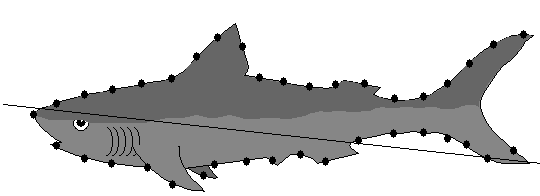
- Texture: There are many ways to do this, but it is not as important as the previous features.
How do you compare two feature vectors? You can simply take the mean-squared error between them, often called the euclidean distance. This produces a number, the smaller that number is, the more similar the two vectors are.
The database portion of the system must be able to build indexes based upon these feature vectors. If you have a 100 component shape feature vector and a 64-component color vector, you have a total of 164 different components that you must efficiently index so that you can quickly retrieve similar images. Another thing that the database system must do is produce ranked results. An image database cannot simply return images that either ARE or ARE NOT similar, things are not so cut-and-dry here. Instead, the database will return a similarity ranking, which combines the scores of each of the feature vector comparisons to determine which image is most similar to the original. Now, the question becomes which similarity measure should have the most weight, is color more important than shape or texture, etc? This is a very complicated issue.
The major problem with CBIR databases is that they tend to retrieve a lot of "false hits." This means that in order to guarantee that a similar image will not be thrown out, the database will retrieve some images that are not relevant but their feature vectors are still "close" to the original image.
The diagram you have in your version of the QBIC paper may be difficult to read, hopefully this one is a little easier:
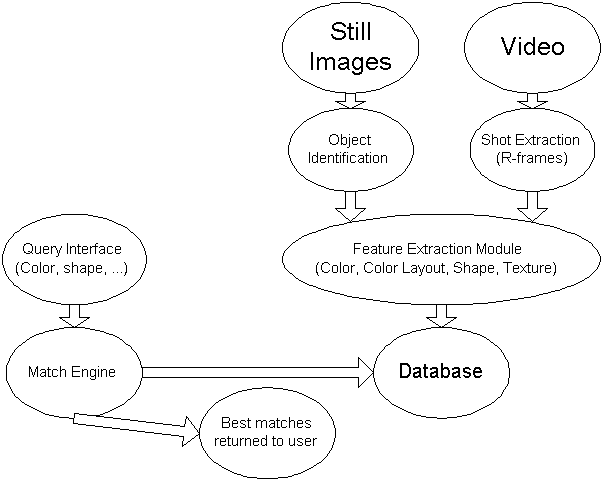
For more information about QBIC, including some interactive demos of how it works, check out http://wwwqbic.almaden.ibm.com
We'll take a look at how to apply these techniques to video next time…