Lecture #6: Constants and expressions
CSE 5A
Bob Pitha
bpitha@cs.ucsd.edu
http://www-cse.ucsd.edu/classes/fa99/cse5a
let’s look at that temperature example again
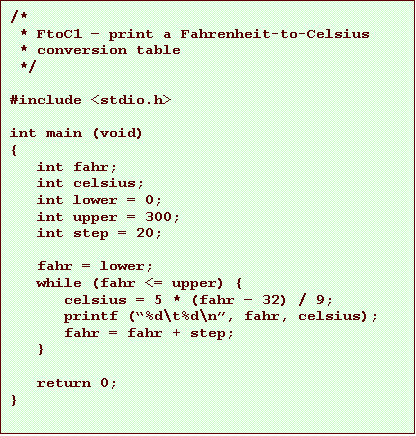
can we make it make sense?
• Take it for granted that it works
• Does it make any sense?
• Why is it done this way?
how would you do it?
• Say I told you to calculate this table
– for each Fahrenheit temperature
• 0 to 300° F
• in steps of 20 ° F
– you have a calculator
– you know that
C = 5/9 (F - 32)
what might you do?
• Write the list of Fahrenheit temperatures
– the left column of the table
• For each temperature in the table
– plug it into the equation
– calculate a Celsius temperature
– write it in the table to the right of the F temperature
a few constraints the computer has
• It only does one thing at a time
• It only remembers things if they’re in memory
• We don’t know how to print like this
– printf doesn’t jump around
– it prints each line sequentially, left-to-right
– you can’t go back
so the program approaches it differently
• Start with the first F temperature (0)
• Do each line fully
– calculate a celsius equivalent
– print out the whole line
• Fahrenheit and Celsius temperatures
• Now increment the last Fahrenheit temperature by 20
– if we haven’t gone over our limit, go back to step 2
the program once more
more data types
• signed/unsigned
• conversion between types
signed/unsigned
• Why bother?
– clarity
– increased range
clarity
• Some data is inherently unsigned
– unlike temperatures
– number of things
• you can’t have –3 oranges
– dates
• -10/-13/-1999?
increased range
• Remember what I said about ranges
– a byte can hold 256 values
• 0 – 255
• -128 – 127
• Why is this?
– a byte has 8 bits
• n bits can represent a number from 0 to 2n-1
• 8 bits can represent a number from 0 to 255
• but then we can’t represent negative numbers

negative numbers
• let’s “steal” one bit to indicate +/-
– say, 0 is positive, 1 is negative
• that way, a positive number is the same as an unsigned number
– we’re left with 7 bits for the number
• 7 bits can represent a number from 0 to 27-1 (which is 127)
• so this way, we could have 0 – 127, either + or –

it doesn’t exactly work that way
• But it’s similar
– one bit is a “sign bit”
– the others represent values
– the details aren’t important
so anyway… signed/unsigned
• Only integer types can be unsigned
– unsigned int
– unsigned char
– unsigned long
– unsigned short
• Unsigned arithmetic works kind of funny
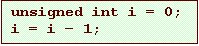
– in this case, i will probably be 4,294,967,296!
• it “wraps around”
type conversions
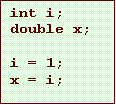
• C can sometimes convert between different types for you
– often it’s just common sense
– smaller to larger
• char to int
• int to long
– less precise to more precise
• float to double
• int to double
what does this mean?
• We can do things like this:
constants: what is a constant?
• Something whose value can’t change
– not a variable
• Could be:
– a literal value we use in our code
• numbers
• strings
• characters
– a variable whose value doesn’t change
– a symbolic name we use in place of a literal value
numerical constants
• Always has a data type
– usually implied
– sometimes explicit
• The computer can sometimes convert data types
– from “smaller” to “larger”
• short to int
• int to long
• float to double
– from less accurate to more accurate
• int to double
using numerical constants
• So you don’t usually have to worry about what type a constant is
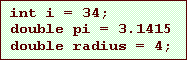
– we won’t bother with explicit types for constants
• i.e., all those L and F suffixes
examples
• 1234
– data type is int
• 1234L
– explicitly declares it to be a long
– but usually not necessary to do this
• 1234.0
– data type is double
character constants
• Just as char is an integral type, character constants are integers too
• A character surrounded by single quotes
– ‘x’
• For unprintable characters, we use “escape sequences”
escape sequences
• Used to represent characters that don’t correspond to a printable character
– start with a backslash \
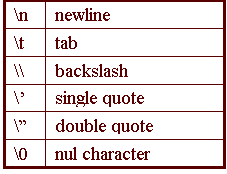
escape sequences
• We’ve already seen two of these
– “Hello, world!\n”
• adds a newline to our output
• otherwise, subsequent output would be on the same line
– “%d\t%d\n”
• we used this to print out a table of temperatures
• lined up the right column
• Don’t stress about these… we’ll use them as we need them
character constants are integers
• The following lines of code have the same effect
– they’re both legal
– but the second is unlikely to be used
