Lecture #3: How is programming like driving a car?
CSE 5A
Bob Pitha
bpitha@cs.ucsd.edu
http://www-cse.ucsd.edu/classes/fa99/cse5a
programming computers
• The “trick”
– figuring out how to get the computer to do what you want it to do
– combining basic “atomic” operations to do interesting things
things we might want to do
• Useful programs
– presentation software (i.e., this program)
– text editor
– computer game
– web browser
computer operations
• Remember – they’re very basic
– get/set memory values
– simple arithmetic
– test values
– execute instructions
getting from operations to programs
• This is “it”
– it’s not easy
– it’s not obvious
– you can usually do something many different ways
• some ways are good
• some suck
so what’s with this driving thing?
• Analogy: driving a car
– why do we drive cars?
•
transportation: get from here to there
• fun: drive fast, look good
• race: drive real fast, don’t crash
– how do we drive a car?
• do we just tell the car where we want to go?
– only in science fiction novels
• we have to control the car
car controls
• What controls do we have?
– ignition key
– steering wheel
– gas pedal
– brake
– clutch
– shifter
– turn signals
– radio
car operations
• So what kinds of operations can we perform?
– ignition key
• turn car on
• turn car off
– steering wheel
• rotate steering wheel clockwise
• rotate steering wheel counterclockwise
– gas pedal
• depress gas pedal (%)
– brake
• depress brake pedal (%)
car operations continued
• What kinds of operations can we perform?
– clutch
• depress clutch pedal (%)
– shifter
• move up
• move down
• move left
• move right
– turn signals
• ignore them
• signal right turn
• signal left turn
and just a couple more…
• Those were all “output” operations
• Input is important too
– your eyes
• look
– your ears
• “loud pipes save lives”
(yawn) so what’s yer point?
• There is no obvious relationship between car operations and what you want to do with a car
• Likewise, there is no obvious relationship between computer instructions and what you want to do with a computer
let’s go a little deeper into this analogy
• Driving directions: how to get from point A to point B
• Example: how did I just get here?
– 5S to La Jolla Village Drive exit
– Turn right on LJVD
– turn right at stop light
– turn left at second stop sign
– turn right at second stop sign
directions?
• None of those directions mentioned any car parts or operations!
• Our brains interpret automatically
– also handle a lot of unmentioned tasks
• This is where the analogy breaks down
– computers can’t make assumptions
– computers can’t interpolate (unless programmed explicitly to do so)
– computers can’t make judgment calls
interpreting directions
• Let’s look at the first direction:
Take 5S to La Jolla Village Drive exit
• What does this really mean?
– assumes I know how to get onto 5S
– stay in my lane
– go the speed limit
– use the brake as necessary
– flip other drivers the bird
but even these aren’t useful!
• Stay in my lane
– what does that mean?
– how could we express this with numbers?
• measure:
– local average of lane direction
– car velocity vector
• compute:
– difference between lane direction and car velocity vector
– desired deflection of velocity vector
• adjust steering wheel
– feedback loop
» magnitude of difference between current and desired direction
» perceived centripetal force
stay in my lane
• Instructions:
– repeat the following continuously:
• get lane direction
• get car direction
• desired deflection = difference (lane direction, car direction)
• desired steering wheel rotation = S * desired deflection
– S (“Steering constant”) is a constant that is unique to my car and my driving style
• turn wheel to desired rotation
• if perceived g-force > Gmax, turn wheel back a bit
details
• Computers are the ultimate detail-oriented things
– they need everything spelled out exactly
– they will follow instructions literally
– they will follow stupid instructions just as diligently as sensible ones
so where does C come in?
• In our analogy, this is how things match up:
– “to get places” : “to balance my checkbook” (or whatever)
– car operations : computer instructions
– driving directions : software design
– instructions : C program
• So when you write a C program, you will be doing things in baby steps.
doesn’t that get boring?
• It sure can
– but there are ways to make things less tedious
• In terms of the driving analogy…
– in every step, you are regulating the car’s speed
– that means that everywhere you’re going to have the same set of instructions
• adjust gas pedal and brake to make the current speed equal to the desired speed
functions
• So, why not write the instructions generically once, and then invoke the same set of instructions from different places in the directions?
– this is the C concept of a function
– functions are groups of statements that can be invoked repeatedly
– functions can take parameters, which allow each invocation to be slightly different
• such as the “desired speed” in the last example
so (finally!) let’s talk about C
• What is C?
– One of countless programming languages
• but one of the more popular
• was considered a “programmer’s” language
– K&R C
– ANSI/ISO 9899-1990 (R1997)
• “ANSI-standard” C
a simple example
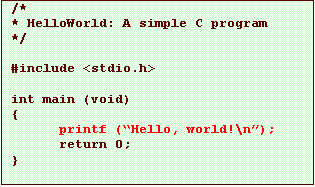
• Here’s a very simple C program:

a simple example
• Here’s a very simple C program:
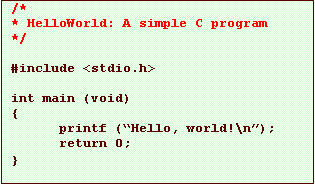
• This is a comment
– comments help explain the program to someone
– they are ignored by the computer.
a simple example
• Here’s a very simple C program:
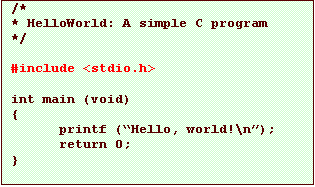
• This is an instruction to the compiler to insert the contents of a file named “stdio.h” into the program
– supplies useful information for the compiler
a simple example
• Here’s a very simple C program:
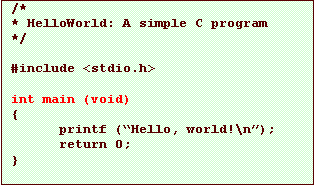
• This tells the compiler we’re about to define a function, named main.
– main is a special function; it is where your program starts running.
a simple example
• Here’s a very simple C program: