Lecture #26: Strings and I/O
December 6, 1999
Bob Pitha
bpitha@cs.ucsd.edu
http://www-cse.ucsd.edu/classes/fa99/cse5a
what’s a string?
• Strings are how we store and manipulate text in C
– they’re made up of characters
– they’re basically arrays of char
• Strings are not a unique data type in C
– but C does have some special stuff to deal with strings
array of char
• If you declare an array of chars like this:
![Text Box: char carray[27];](./Lecture26_files/image001.gif)
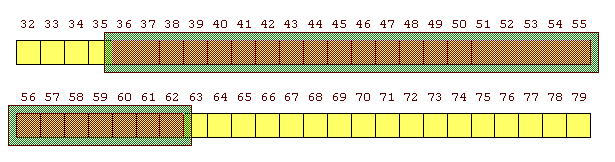
what have you declared?
– really, just a bunch of adjacent bytes in memory
– not too dissimilar to our earlier arrays of ints
• except each element is 1 byte instead of 4
initializing arrays of char
• Just like any array, we can initialize an array of chars:
![Text Box: char carray[27] = {‘H’, ‘e’, ‘l’, ‘l’, ‘o’};](./Lecture26_files/image004.gif)
• Remember our rules of array initialization
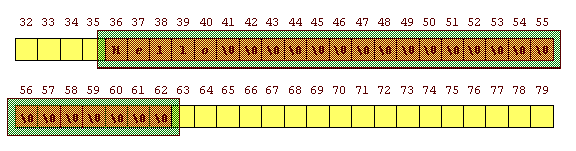
– we can have as many initializers as we have array elements
– we can have fewer, but not more
– if we have fewer, the remaining elements get set to 0
implied-length initialization
• Remember, too, that we can let the compiler figure out how big to make the array
– just by leaving the square brackets empty
![Text Box: char carray[] = {‘H’, ‘e’, ‘l’, ‘l’, ‘o’};](./Lecture26_files/image007.gif)
– since there are 5 initializers, the compiler makes a 5-element array

problem…
• How does the computer know how long a string is?
– the answer is, it doesn’t
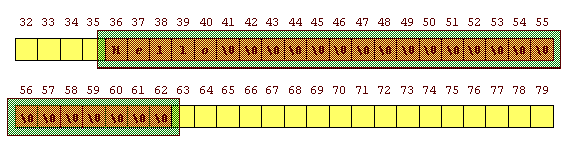
– just like our scores array, we can use as much or as little of the array as we like
– so here we’ve used 5 of the 27 bytes
– and we can tell by looking, because the rest is set to 0
but that’s not always true
• Here’s our other case – where we sized the array implicitly
– since we don’t know what comes next in memory, we can’t tell by looking where the array ends
– it may well not be a 0

strings vs. arrays of char
• So C adds a convention here about how strings are stored.
– they’re stored in arrays of char, but there’s more to a string than just that
– the convention is that an extra character is added to the end of the string
• this is the nul character – ASCII value 0
so our initialization should have been…

![Text Box: char cstring[] = {‘H’,’e’,’l’,’l’,’o’,’\0’};](./Lecture26_files/image015.gif)
string literals
• Sometimes called “string constants”
• A string literal is a sequence of zero or more characters enclosed in double quotes
– like
this: “xyz” or
“Hello, world!\n”
– we’ve already used these a lot
what are string literals?
• When we use a string literal in our code:

– the compiler sets up a character array in memory for us, just long enough to hold the string
– the array is initialized using the contents of the string, with a null character (’\0’) added to the end

– and just like any array, when we use it in a context where we would be getting the value of a variable, we get a pointer to the first byte of the string.
so let’s check that…
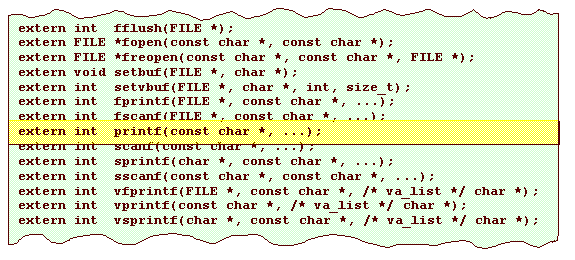
• Let’s look at the function prototype for printf
– which, as we should remember, is in the file stdio.h
printf declaration
• We don’t know enough to fully understand this, but let’s talk about what we can…

– this declaration says that the identifier printf is the name of a function
• that function may be defined externally to the current file
• the
function returns an int
• it takes at least one argument
– that
argument is a const char *
const char *
• What’s that “const” thing?
– it’s another storage class specifier
– it says that, for a variable or array, the value(s) in it cannot be altered
– in this case, it means that printf gets an argument that is a pointer to the first character of a string
• but printf promises it won’t change the contents of that string
printf argument
• So remember, we have always (so far) called printf with a string literal as the first argument
• And what printf is actually passed is a pointer to a char (which is the beginning of a string)
using strings
• So the first thing we can do with a string is create one. We’ve seen a clumsy way to do this earlier:
![Text Box: char cstring[] = {‘H’,’e’,’l’,’l’,’o’,’\0’};](./Lecture26_files/image022.gif)
– but this could get really tedious to initialize long string variables!
– so C gives us a nicer way:
![Text Box: char cstring[] = “Hello”;](./Lecture26_files/image023.gif)
two similar but different strings
• We just created a string named cstring
![Text Box: char cstring[] = “Hello”;](./Lecture26_files/image024.gif)
– but the following is legal too:

– they look very similar, but it’s important to keep them distinct
comparison
• We’ve already said what the first one does:
![Text Box: char cstring[] = “Hello”;](./Lecture26_files/image026.gif)

comparison
• The second is a little more complex…

comparison
• The second is a little more complex…

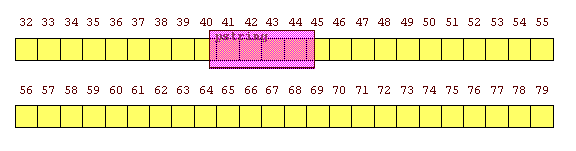
– we’re declaring a variable named pstring, so the compiler will reserve some memory for it
• it’s a pointer to a char
comparison
• The second is a little more complex…

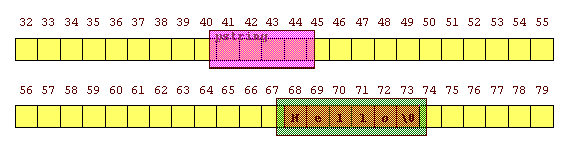
– remember whenever we use a literal, the compiler sets up an array for us
• we don’t know where in memory it will do this, but we shouldn’t care
• we just get a pointer to it, wherever it is
comparison
• The second is a little more complex…

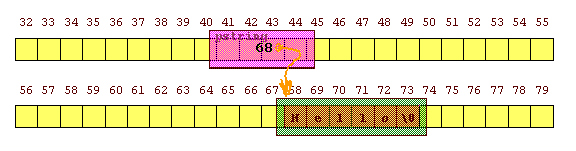
– and finally, the pointer pstring is initialized to the address of the array that was created for us
so what’s the difference?
![Text Box: char cstring[] = “Hello”;
char *pstring = “Hello”;](./Lecture26_files/image038.gif)
• The first creates an array variable
– we “own” the whole thing
• we created it
• we can change the contents
• The second creates a pointer variable
– we “own” the pointer
• we can change its value to point somewhere else
– but the compiler created the string for us
• we are not supposed to change its contents
but the two are very similar
![Text Box: char cstring[] = “Hello”;
char *pstring = “Hello”;](./Lecture26_files/image039.gif)
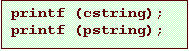
• Remember that in most contexts, when we use the name of an array variable, we get a pointer to the first element
– that means that in many cases, these two variables can be used interchangeably
what else can we do with strings?
• We can make an array of pointers to strings
![Text Box: char *dayName[] = {“Sunday”, “Monday”, “Tuesday”,
“Wednesday”, “Thursday”, “Friday”, “Saturday”};](./Lecture26_files/image041.gif)
– this makes an array of 7 elements
– each element is a char *
– each element is initialized with a pointer to one of those string literals
– this is very useful:
![Text Box: printf (“%s\n”, dayName[i]);](./Lecture26_files/image042.gif)