Lecture #25: Arrays 3
December 3, 1999
Bob Pitha
bpitha@cs.ucsd.edu
http://www-cse.ucsd.edu/classes/fa99/cse5a
pointer subtraction
• Subtraction with pointers follows the same logic as addition, but the rules are necessarily different
– instead of moving forward in the array, as addition does, we’re moving backwards
– so given the declarations:
int a[8];
int *p = a+4;
– p now points to
element a[4],
the fifth element of a
– the expression p-2 evaluates to a pointer to a[2], the third element of a.
example
![Text Box: int a[8];
int *p, *q;
p = a+4;
q = p-2;](./Lecture25_files/image001.gif)
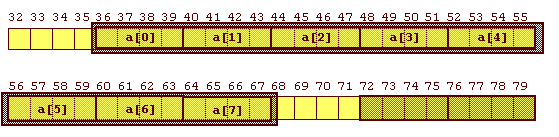
example
![Text Box: int a[8];
int *p, *q;
p = a+4;
q = p-2;](./Lecture25_files/image004.gif)
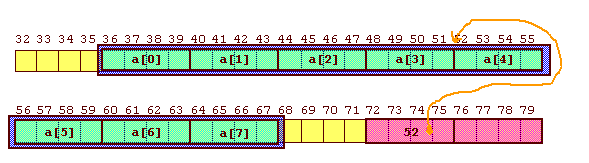
example
![Text Box: int a[8];
int *p, *q;
p = a+4;
q = p-2;](./Lecture25_files/image007.gif)
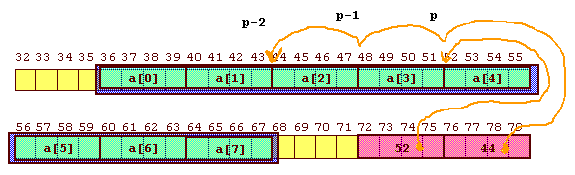
pointer subtraction
• So just like with addition, the – operator can take a pointer and an integer as operands
– but you can only subtract an integer from a pointer, not vice versa
• You can go 2 lockers to the left of locker #583
• You can’t go locker #583 to the left of 2
• But unlike addition, you can subtract one pointer from another
– as long as the two pointers point to exactly the same type
pointer-pointer
• You can think of this algebraically:
– given the following declarations:
int a[8];
int *p1 = a+2;
int *p2;
if
p2 = p1 + 3
then
p1 == p2 – 3
and
p2 – p1 == 3
so pointer subtraction…
• … gives us the number of “things” between the two pointers.
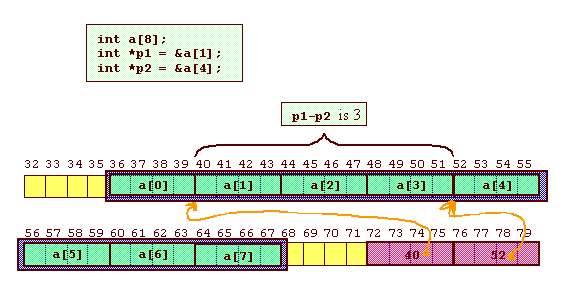
so back to our example…
![Text Box: #include <stdio.h>
int InputScores (double *);
void PrintStats (double *, int);
int main (void)
{
double scores[250];
int numScores;
printf (“Scores: a program to compute grade statistics.\n”);
printf (“Enter all scores, finish with –1:\n\n”);
numScores = InputScores (scores);
PrintStats (scores, numScores);
}](./Lecture25_files/image012.gif)
• Now we need to write the two functions
– InputScores
– PrintStats
what’s this supposed to do again?
• So let’s keep things simple: imagine there are only 5 students in my class
– they get the following scores on an exam: 57, 85, 97, 16, 82
– this is what I’d like my program to do:
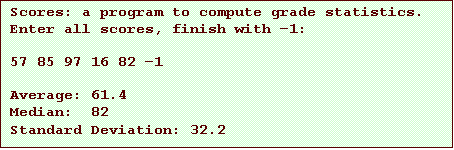
PrintStats()
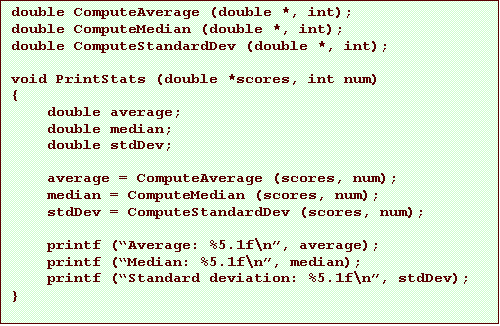
• So the PrintStats function should:
– take the array and the number of scores as arguments
• remember that our array can hold up to 250 scores
• but that doesn’t mean that all 250 were entered
– it should compute the average, median, and standard deviation, and print them out
– the function declaration is this:

so let’s write the function
• First of all, we need to give names to our parameters
– the declaration doesn’t need names; all it needs are the data types
– but the actual function definition is declaring local variables to use within the function; these variables need names
• We also can put in the braces that will surround the code for the function

so what’s the function going to do?
• It must:
– compute the average
– compute the median
– compute the standard deviation
– print the statistics
• Let’s punt on the math for now…
– after all, this is a computer class, not a statistics class
– we’ll just use three more functions, which we can write later
our function so far
how would we do those functions?
![Text Box: /*
* ComputeAverage: calculate and return the average
* of the numbers in an array
*/
double ComputeAverage (double *array, int size)
{
int i;
double sum = 0.0;
for (i = 0; i < size; ++i)
sum += array[i];
return sum/size;
}](./Lecture25_files/image017.gif)
next…
• Now we have to implement InputScores

• What this will do:
– keep reading numbers from the keyboard until the user enters a negative number
– store all the entered numbers in the array
– return the number of entries
• So as before, let’s set things up for the code
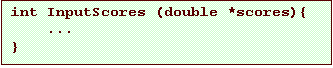
function InputScores
• Now what?
– we want to do the following:
• read a number
• if it’s negative, return
• otherwise, store it in the array
• increment a running count of the number of entries
• and go back to read another one
– doesn’t this sound a lot like a loop?
• we’re repeating the same steps over and over
choosing a loop
• We have 3 main kinds of loops at our disposal
– for
– while
– do while
• How do we choose?
– in reality, we could use any of the three
InputScores using while
• Here’s one way to do it:
![Text Box: int InputScores (double *scores)
{
int count = 0;
double score;
scanf (“%lf”, &score);
while (score >= 0.0) {
scores[count] = score;
count += 1;
scanf (“%lf”, &score);
}
return count;
}](./Lecture25_files/image020.gif)
InputScores using while
• Or slightly more compactly:
![Text Box: int InputScores (double *scores)
{
int count = 0;
double score;
scanf (“%lf”, &score);
while (score >= 0.0) {
scores[count++] = score;
scanf (“%lf”, &score);
}
return count;
}](./Lecture25_files/image021.gif)
another InputScores
![Text Box: int InputScores (double *scores)
{
int count = 0;
double score;
scanf (“%lf”, &score);
while (score >= 0.0) {
scores[count++] = score;
scanf (“%lf”, &score);
}
return count;
}](./Lecture25_files/image022.gif)