Lecture #23: Arrays
November 29, 1999
Bob Pitha
bpitha@cs.ucsd.edu
http://www-cse.ucsd.edu/classes/fa99/cse5a
on Friday…
• We talked about how pointers can be used as function arguments (section 5.2)
– an argument allows only one-way information flow
• it’s data that goes into the function, not out
• the only data that comes out is via the return value
– but we can be sneaky…
• before we passed in data values
• but we can also pass in pointers, that point to data values
– the function can change what’s at the address that was passed in
– and the calling code can then retrieve the changes
also on Friday…
• We introduced the concept of extent
– describes when a variable exists
• that is, when memory is being used for the variable
– complements the concept of scope, which we introduced a while ago
• Extent is important now
– without pointers, it’s less important
• because whenever the variable is in scope, it exists
• but now that we have pointers, we can potentially have a pointer to a variable that has ceased to exist
arrays
• So far, we have been using only scalar variables
– “scalar” meaning a variable with a single value
• But many things require a set of related values
– coordinates or vectors require 3 (or 2, or 4, or more) values
– text requires a long list of characters in a specified order
– spreadsheet data is often a long list of numbers
what is an array?
• The spec says: “...a continuously allocated nonempty set of objects with a particular member object type”
• In real language: a bunch of things of the same type
– each value is like a little variable
– but all you really need to know is
• where the array starts (a pointer, usually)
• what type of data is in the array
– all elements of an array are always the same data type
• how many elements are in the array
example
• So let’s say I want to write a program to compute the average, median, and standard deviation for the midterm exam
– I want to be able to reuse this program every term, so I can’t build in a knowledge of how many students there are in the class
– what I’d like is a program where just keep entering scores until I’ve entered them all
• I could have a nonsense input, like –1, to signal that I’ve entered all of the scores
scores example
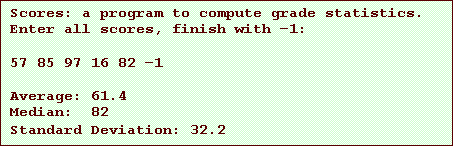
• So let’s keep things simple: imagine there are only 5 students in my class
– they get the following scores on an exam: 57, 85, 97, 16, 82
– this is what I’d like my program to do:
how can we do that?
• Since we don’t know how many scores will be entered, we can’t know how many variables to create
– this will actually be a problem anyway, so we’ll have to build in a maximum class size
– let’s say there will never be more than 250 students in a class
– but still, the program will be awkward at best, since we have to read in an arbitrary number of values, and then add them up
so look at this example
![Text Box: #include <stdio.h>
int InputScores (double *);
void PrintStats (double *, int);
int main (void)
{
double scores[250];
int numScores;
printf (“Scores: a program to compute grade statistics.\n”);
printf (“Enter all scores, finish with –1:\n\n”);
numScores = InputScores (scores);
PrintStats (scores, numScores);
}](./Lecture23_files/image002.gif)
array declaration
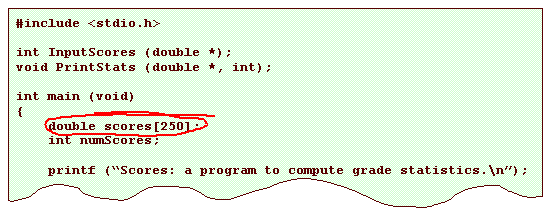
• This declares a variable named “scores”
– it is an array of 250 doubles
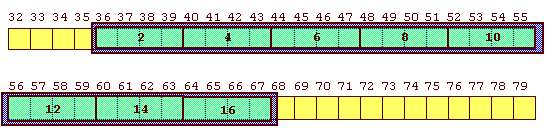
– thus, it reserves enough memory for 250 contiguous doubles (1000 bytes)
array declarations
• As with other declarations, array variable declarations include:
– a data type
– a variable name
– ends with a semicolon
• But in addition, an array declaration has:
– a length, enclosed in square brackets
type name[length];
– we say that name has the type “array length of type”
• so in our previous example, scores is “array 250 of double”
initialization
• As with other declarations, array declarations can include an optional initialization
– scalar variables are initialized with a single value
– arrays are initialized with a list of values
• the list is enclosed in curly braces
int array [8] =
{2, 4, 6, 8, 10, 12, 14, 16};
more about initialization
• The number of initializers cannot be more than the number of elements in the array
– but it can be less
– in which case, the remaining elements are initialized to 0
• If you like, the array size can be inferred from the number of initializers
– by leaving the square brackets empty
– so these are identical declarations
int array1 [8]
= {2, 4, 6, 8, 10, 12, 14, 16};
int array2 [] =
{2, 4, 6, 8, 10, 12, 14, 16};
but what does this do?
int array [8] =
{2, 4,
6, 8, 10, 12, 14, 16};
what can we do with arrays?
• All well and good, but how do we use arrays?
• There are two main things you can do with an array:
– you can refer to an element in the array
– you can get the address of the first element in the array
array elements
• When we refer to an array element, we use a subscript expression:
– the operator is the square bracket pair [ ]
– the operands are the array variable, and the index expression

subscript expression
• Some details about the subscript expression
– for an array N of T, the data type of the subscript expression is T
• that
is, the data type of array[i]
is int
– the expression inside the square brackets must have integral type
• that is, it can be char, short, int, or long
• but not double, float, long double, a pointer, an array, …
address of first element
• When we use the array name in any value context, it is converted into a pointer to the first element of the array
– what’s a value context?
• any use where the expression simply retrieves the value, and doesn’t try to modify it
– the type of the pointer is “pointer to T”
• when the array type is “array N of T”
The Rule
In a value context, the name
of an array of type “array N of T” becomes a “pointer to T”
• Remembering this rule will make arrays and pointers seem much more sensible
• Forgetting this rule will make them confusing
example
![Text Box: #include <stdio.h>
int main (void)
{
int array [8] = {2, 4, 6, 8, 10, 12, 14, 16};
int *p1, *p2;
p1 = array;
p2 = &array[0];
printf (“%d %d\n”, *p1, *p2);
return 0;
}](./Lecture23_files/image009.gif)