Lecture #20:
November 19, 1999
Bob Pitha
bpitha@cs.ucsd.edu
http://www-cse.ucsd.edu/classes/fa99/cse5a
what are elements of programming style?
• Naming
– we talked about the importance of choosing good names for things
• Formatting
– we talked about how formatting can make the difference between readable and unreadable programs
• Consistency
• Magic numbers
• Comments
consistency
• There are lots of opinions about what the best style is
– but more important than finding “the best” is to find a style a stick with it
– people will get used to it, and be better able to read your code
things to be consistent about
• Pick a personal style for:
– how much you indent each level
• I use 4 spaces
– where you put braces
• I put open braces on a new line for function beginning
• On the same line for statements that include a block
– spacing: where you use spaces
magic numbers
• Magic numbers are constants that appear throughout a program

so what?
• They make a program difficult to read and maintain
– You don’t always know what the significance of “37” is in the program
– If you want to change one of these numbers, you have to hunt down every occurrence of it
• and decide whether this is an occurrence that should change or not
what are the alternatives?
• You could use variables whose values you never change
– but they would have to be accessible throughout your program
• You can use symbolic constants
– our second example of a preprocessor directive
preprocessor directives
• The preprocessor is one of the first steps in compiling your program
– it scans the program and makes some changes to the source code before it gets read by the compiler
– these changes are temporary
• they only affect what the compiler sees
• they don’t actually change your program file
#include <filename>
• We’ve seen and used this a lot, but never really discussed it
– it tells the preprocessor to find the named file and insert its contents into the code file at that location
– there are various rules as to where the file is searched for
• #include “filename” means first look in the same directory that the current file is in, then apply the other rules
• #include <filename> means don’t first look in the current directory
• So far we’ve only included stdio.h
#define
• Here’s our second preprocessor directive
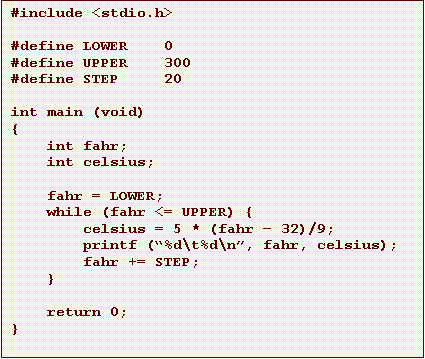
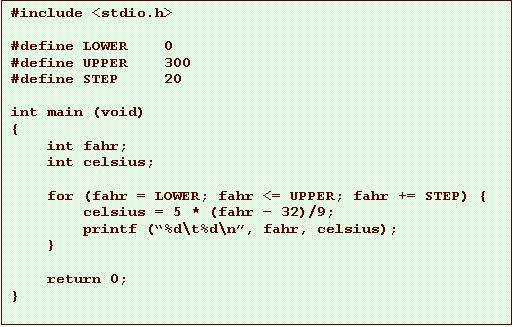
– this creates a symbolic constant that you can use later in the code
• it associates a name with a string
• the string is substituted for the name wherever it appears

example
example (using for instead of while)
more about #define…
• This name follows the same rules as identifiers
– letters, digits, underscore
– can’t start with a digit
• The text is just substituted for the name
– no values, no data types; just text
– it’s like if you used the Replace function of your editor
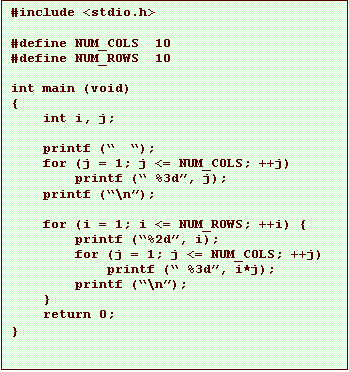
another example
•
This was the
multiplication table example
–
note that the number 10
shows up 3 times

another example
•
Now we’ve replace the
10’s with appropriate names
–
Hopefully, the program
is a bit more readable now
–
It’s also easier to
change the number of rows without changing the number of columns
comments
• Comments help the reader
– they’re totally ignored by the compiler
– they’re just annotations you can add to make it easier to read your code
• You should add comments to describe:
– what variables do, if it’s not obvious
– what sections of your code do, if it’s not obvious
comment syntax
• Comment rules:
– a comment begins with the characters /*
• no space between them
– a comment ends with the characters */
– a comment can span many lines
comment example

commenting style
• Pick a comment style
– then stick to it



commenting advice
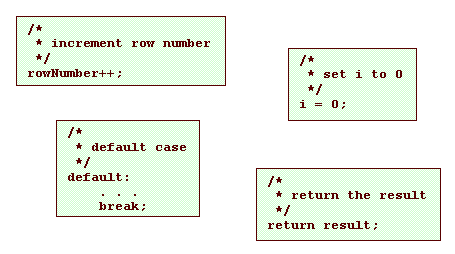
• Don’t belabor the obvious
commenting advice
• Comments should add meaning, not repeat it
– if you can achieve clarity without comments, that is good
• by naming variables approrpriately
• by formatting your code well
– but whenever you think a comment would make the code more readable, add one
example