Lecture #2: Computers and computer
languages
CSE
5a
Bob
Pitha
administrivia
• Class
web page
– not much
there yet, but keep your eyes on it.
• Discussion
section
– CSB 001,
Weds. 6:50-7:40 PM
understanding computers
• Understanding
programming requires that you understand computers
• How
does a computer work?
– Idiot savant
– Very good
with a small number of tasks
– Completely
clueless otherwise
what can computers do well?
• Store
and retrieve numbers
– very quickly
– very
accurately
• Add,
subtract, multiply, and divide
– also fast
and accurate
• Compare
numbers (with 0)
• Follow
a list of instructions
– jump around
in the list
that’s about it
• What
about everything else?
– more complex
math
• combination
of atomic operations
– interaction
with peripheral devices
• output:
graphics cards and printers
• input:
keyboards, mice, joysticks
• all sorts of
specialized devices
– everything
done using numbers
computer numbers
• To
the computer, everything is numbers.
• Computers
use binary (base 2)
– each digit
is 0 or 1
– represents a
power of 2
human numbers
• You
are familiar with decimal (base 10)
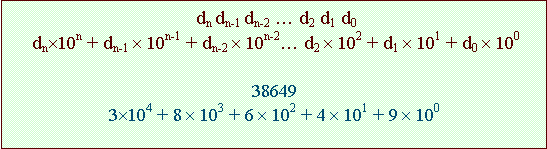
binary

• Example:
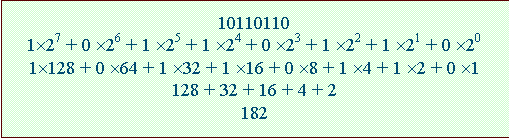
teminology
• bit: binary digit
• byte: a group of 8 bits
• nybble
(obsolete): half a byte
• word: a group of bytes that a specific computer is
optimized for working with (usually 4 or 8)
• kilobyte
(K or KB): 1,000 bytes, or sometimes 1,024 bytes (210)
• megabyte
(M or MB): 1,000,000 bytes, or sometimes 1,028,576 bytes (220)
why all these powers of 2?
• Everything
is little electronic switches
– off or on
– true or
false
– yin or yang
– 0 or 1
• Decimal
is foreign to the computer
– it can
convert a number to decimal, but that’s really only for human convenience
• The
computer works in base 2
other numbering systems
• octal – base 8
– used rarely,
but you should at least recognize it
– digits are 0
through 7
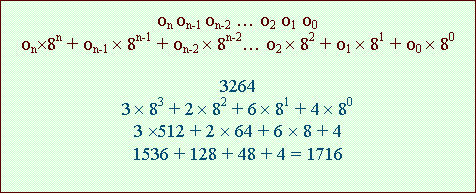
other numbering systems
• hexadecimal – base 16
– used
occasionally – you can’t really avoid it
– digits are
0-9, a-f
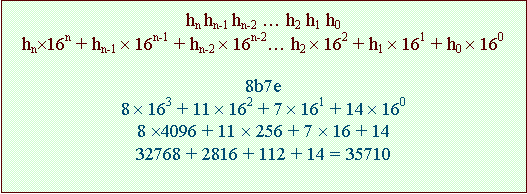
other numbering systems
• You
do not have to be fluent in either of these (octal or hex) for this class
– recognize
them
– don’t be
scared of them
– know how to
convert if you need to
• but you will
rarely need to
byte
• A
group of bits
– almost
always 8
– some strange
computers may have other byte size
– but they’re
not an issue for this class
• The
fundamental unit of data for the computer
• Can
represent 256 values
– 0 to 255
– -128 to 127
word
• Also
fundamental to the computer
• A
group of bytes
– usually 4 or
8
– for the
computers we’ll work with, it’s 4
• 4
bytes
– 32 bits
– 0 to
4,294,967,295
– or more
usually, –2,147,483,648 to +2,147,483,647
inside the computer…
• Everything
is bits
• Bits
are always grouped
– into bytes
– into words
• Every
byte is numbered
– sequentially
– called an address
– addresses
are, of course, numbers themselves
computer instructions
• Computers
execute instructions
• Instructions
are numbers
– memory
access (get/put)
– arithmetic
(add, subtract, multiply, divide)
– compare
values (equal, greater than, less than)
– change the
order instructions are executed in
• often based
on the result of a comparison
what kinds of numbers do computers work with?
• Instructions
• Addresses
• Data
– integers
– real numbers
– text
– all sorts of
other things
what is a computer program?
A sequence of processor
instructions designed to achieve a specific purpose
what is a computer program?
A
sequence of processor instructions designed to achieve a specific
purpose
• Computers
execute programs sequentially
• Unlike,
say, a shopping list
• More
like driving directions
– each
instruction depends on the last one being completed
what is a computer program?
A sequence of processor instructions designed to achieve a specific
purpose
• Each
instruction has a numerical code
• Examples:
– Get some
data from memory
– Add two
numbers
– If two
numbers are equal, jump to a different part of the program
• To
us, it all just looks like numbers
what is a computer program?
A sequence of processor
instructions designed to achieve a specific purpose
• This
is important!
• Instructions
are numbers
• Random
numbers can be executed
– but will not
be a program
00401040 55 8B EC 83 EC 5C 53 56 57 6A 00 FF 15 B8 C2
42
00401050 00 89 45 FC 83 7D FC 00 7D 1B 68 0F 10 40 00
68
00401060 14 61 42 00 B9 E8 99 42 00 E8 32 05 00 00 8B
C8
00401070 E8 90 FF FF FF 8D 45 EC 50 8B 0D 50 8D 42 00
51
00401080 FF 15 C0 C2 42 00 89 45 FC 83 7D FC 00 7D 20
68
00401090 0F 10 40 00 68 F8 60 42 00 B9 E8 99 42 00 E8
FD
004010A0 04 00 00 8B C8 E8 5B FF FF FF E9 9C 00 00 00
68
004010B0 0F 10 40 00 68 D8 60 42 00 B9 E8 99 42 00 E8
DD
004010C0 04 00 00 8B C8 E8 3B FF FF FF 8D 55 E4 52 68
28
004010D0 71 42 00 6A 01 6A 00 68 18 71 42 00 FF 15 C4
C2
004010E0 42 00 89 45 FC 83 7D FC 00 7C 1D 68 0F 10 40
00
004010F0 68 B4 60 42 00 B9 E8 99 42 00 E8 A1 04 00 00
8B
00401100 C8 E8 FF FE FF FF EB 43 8B 45 FC 50 68 88 60
42
00401110 00 E8 6A 25 00 00 83 C4 08 68 0F 10 40 00 68
84
00401120 60 42 00 8B 4D FC 51 68 60 60 42 00 B9 E8 99
42
00401130 00 E8 6A 04 00 00 8B C8 E8 33 01 00 00 8B C8
E8
00401140 5C 04 00 00 8B C8 E8 BA FE FF FF FF 15 BC C2
42
00401040 push
ebp
00401041 mov
ebp,esp
00401043 sub
esp,5Ch
00401046 push
ebx
00401047 push
esi
00401048 push
edi
00401049 push
0
0040104B call
dword ptr [__imp__CoInitialize@4 (0042c2b8)]
00401051 mov dword ptr
[ebp-4],eax
00401054 cmp
dword ptr [ebp-4],0
00401058 jge
main+35h (00401075)
0040105A push
offset @ILT+10(endl) (0040100f)
0040105F push
offset string "CoInitialize failed." (00426114)
00401064 mov
ecx,offset cout (004299e8)
00401069 call
ostream::operator<< (004015a0)
0040106E mov
ecx,eax
00401070 call
@ILT+0(ostream::operator<<) (00401005)
00401075 lea
eax,[ebp-14h]
00401078 push
eax
00401079 mov
ecx,dword ptr [pid (00428d50)]
0040107F push
ecx
00401080 call
dword ptr [__imp__CLSIDFromProgID@8 (0042c2c0)]
00401086 mov
dword ptr [ebp-4],eax
00401089 cmp
dword ptr [ebp-4],0
0040108D jge
main+6Fh (004010af)
0040108F push
offset @ILT+10(endl) (0040100f)
00401094 push
offset string "CLSIDFromProgID failed." (004260f8)
00401099 mov
ecx,offset cout (004299e8)
0040109E call
ostream::operator<< (004015a0)
004010A3 mov
ecx,eax
004010A5 call
@ILT+0(ostream::operator<<) (00401005)
004010AA jmp
main+10Bh (0040114b)
004010AF push
offset @ILT+10(endl) (0040100f)
004010B4 push
offset string "CLSIDFromProgID succeeded." (004260d8)
machine language
• The
one “true” computer language
– …except
there isn’t just one
– Every
computer has its own machine language
• All
other computer languages created for human convenience
– The computer
doesn’t understand C
– Must be
converted into machine language
computer languages
• Assembler
– essentially
just machine language with some text codes
• Compiled
languages
– converted
into machine language before use
– examples: C,
Pascal, Fortran
• Interpreted
languages
– converted
into machine language during use
– examples:
Basic, Java
why more than one?
• Meet
different needs
• Tradeoffs
• Different
approaches
• Special
features
meet different needs
• Application
domain
– programmer
prefers to think about the application
• Computer
domain
– programmer
is willing to think about the computer
tradeoffs
• Control
• Ease-of-programming
• Performance
• Flexibility
different approaches
• Procedural
• Object-oriented
special features
• There
are lots of special-purpose languages
– video games
– robots
– artifical
intelligence
– embedded
systems
– etc.