Lecture #14: Writing programs
November 3, 1999
Bob Pitha
bpitha@cs.ucsd.edu
http://www-cse.ucsd.edu/classes/fa99/cse5a
how do we write programs?
• We’ve looked at a number of example programs
– some we’ve even talked about how they work
– but we haven’t talked about how to create one
• What we do know:
– how to create variables (declarations and data types)
– the most common/useful operators and expressions
– almost all of the possible statements
• With these building blocks, we can begin writing simple programs that actually do something interesting
but… but…
• It’s a big step from knowing these thing to:
– being able to interpret a program
– being able to write a program
• Let’s learn how to do both of these
interpreting a program
• Say we’re given a program like this one:

what do we see right away?
•
We see a declaration
–
2 variables, i and j
•
We see a loop
–
the variable j goes
from 1 to 10, and we just print it out
•
We see another loop
–
this time, i goes from
1 to 10
•
and a nested loop,
where j goes from 1 to 10
|
|

the first loop
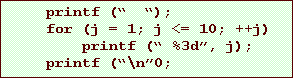
• Anyone want to guess what this first loop does?
the first loop
• Anyone want to guess what this first loop does?
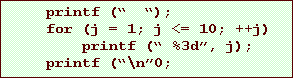
• It loops over the numbers from 1 to 10
– and prints each one out
– remember that ‘\n’ is a newline
– so all the numbers are printed on the same line

the second loop
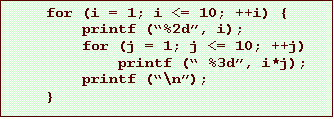
• This is a bit more involved
– we have a nested loop here
– that means that each time we go through the outer loop, we run the whole inner loop completely.
• we run the body of the outer loop 10 times
• each time, the inner loop runs 10 iterations
• so the body of the inner loop is run 100 times
the second loop
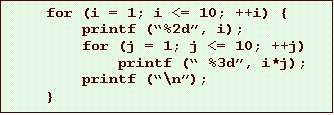
• So first, i is set to 1
– and we print it (no newline)
– then the inner loop takes j from 1 to 10
• and each time we print out i * j with no newline

the second loop
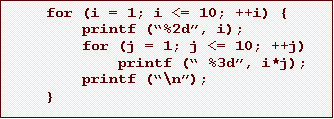
• The next time, i is 2
– and we print it (no newline)
– then the inner loop takes j from 1 to 10
• and each time we print out i * j with no newline

the second loop
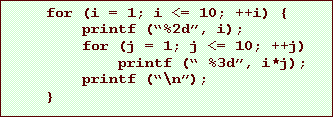
• The next time, i is 3
– and we print it (no newline)
– then the inner loop takes j from 1 to 10
• and each time we print out i * j with no newline

so put the output together…
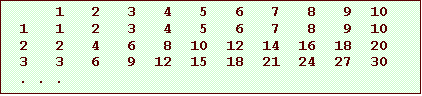
• This program prints a multiplication table
– would you have been able to figure that out?
– you should
– this is a very simple program. Most real programs are much more complicated.
now let’s talk about writing a program
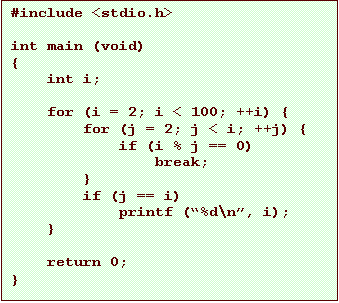
• Say I ask you for a program to print out all prime numbers that are less than 100
– There are various ways to do this.
– Let’s just do a very simple approach…
what is a prime number?
• A prime number is an integer whose only integer divisors are 1 and itself.
– that is, for a prime number p, there are no integers a and b such that a time b equals p
– so given an arbitrary number i, we could decide if it’s prime by just dividing it by every number between 2 and i-1
how does that help us?
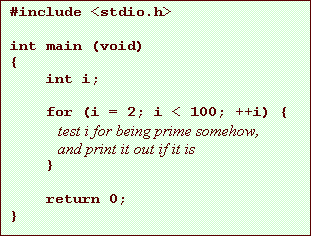
•
If we can test a number
to see if it’s a prime, all we have to do is loop from 2 to 100, and test each
number.
–
if it’s a prime, we
print it out.
so how do we test it?
• Remember, we just need to divide it by every number between 2 and i-1, and see if any of them divide evenly
– this is a perfect use for the % operator
– if the remainder is 0, then the number divides evenly
– so…
• is (i % 2) equal to 0?
– if so, i is not prime and we can go on to the next value of i
• otherwise, is (i % 3) equal to 0?
– if so, i is not prime and we can go on to the next value of i
• otherwise, is (i % 4) equal to 0?
– if so, i is not prime and we can go on to the next value of i
• and so on…
– this looks like a perfect use for a loop!
our loop
• For any i, we want to loop over all numbers between 2 and i-1
– well, we can do that like this:
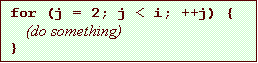
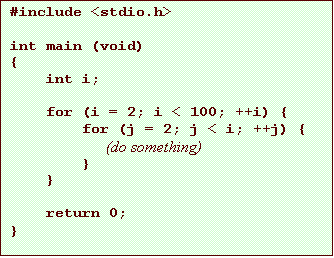
– but what’s the “something” we have to do?
• divide i by each value of j
• if any of them divide with no remainder, then i is not prime so don’t print it out
• if none of them divide with no remainder, i is prime so print it
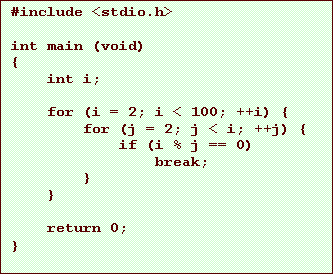
so our program so far…
first step…
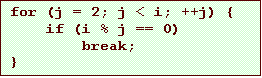
• We need to calculate the remainder of i/j for each j in the loop…
– that’s exactly what the expression (i % j) gives us
– if that expression is equal to 0, then i is not prime
so our program so far…
finally…
• We’ve figured out how to tell if it is not prime
• Now we need to print it if it is prime
– which it is if we got through the loop without finding an integer divisor
• that is, without hitting the break statement
– how can we tell that?
• look at the program again…
our program so far (again)
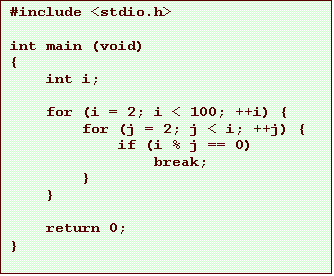
how we tell…
• We want to distinguish between exiting the loop via the break statement and exiting due to the loop control expression being false
– which would mean that we’ve incremented j to the point where the control expression (j < i) is false
• which means j would be equal to i
so the working program