Lecture #12: Statements 3
Friday, October 29, 1999
Bob Pitha
bpitha@cs.ucsd.edu
http://www-cse.ucsd.edu/classes/fa99/cse5a
the if statement
• Only allows 2 choices: true and false
• Can be extended using if/else if/…/else
there is a conditional expression, too
• A ternary expression (3 operands)
• Allows you to embed a simple decision inside an expression
• No side-effects
• A convenient shorthand for simple if statements.
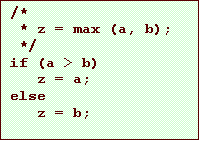
conditional expression
expr1 ? expr2 : expr3
• expr1 is evaluated first
• If expr1 is non-zero (true), then the value of the overall expression is the value of expr2
• If
expr2 is zero (false), then the value of the overall
expression is the value of expr3
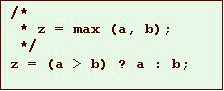
conditional expression details
expr1 ? expr2 : expr3
• Only one of the two expressions after the ? is evaluated.
– this means if one of those expressions has a side-effect, it only happens if that’s the selected expression

the switch statement
• A multiway conditional statement
– similar to the if-else if-else “statement”
– allows the selection of an arbitrary number of choices based on an integer value
switch (expression) {
case const-expr: statements
case const-expr: statements
…
default: statements
}
the switch statement
switch (expression) {
case const-expr: statements
case const-expr: statements
…
default: statements
}
• expression must have an integral value
• When the switch statement is executed:
– the expression is evaluated
– if a case matches the value of the expression, the program jumps to the first statement after that case label
– otherwise, the default case is selected
switch example
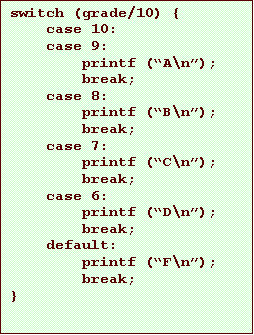
what’s that “break;”?
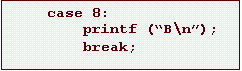
• When the switch transfers to the chosen case, it starts executing statements at that point
• It will keep going into the next case unless you do something
– break; is that something
• it causes the program to immediately jump to the next statement after the switch statement
• “breaking” out of the switch statement
falling through
• Without the break statement, execution would keep going into the next case
• We call this “falling through”
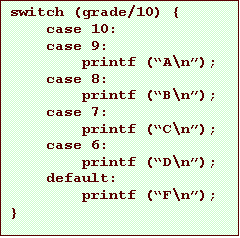
falling through
• We can sometimes make use of this:
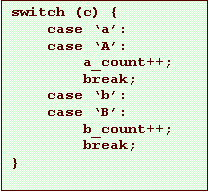
switch vs. if
• In many cases, you can rewrite one using the other
– but often one is easier and more readable
iteration statements
• Also called “loops”
• We have three “flavors”:
– while
– for
– do-while
• All do similar things
– repeatedly execute a statement until some condition is not met
iteration statements
• Like if, all iteration statements have one or more control expressions
– these control the execution of the loop
• …and a loop body
– this is the statement (or block) that gets repeatedly executed
while loops
while ( expression ) statement
• As with the if statement, expression is evaluated as true (non-zero) or false (zero)
• When this loop is executed:
– the expression is evaluated
– if the expression is true the statement is executed
– then the expression is evaluated again
– if the expression is true the statement is executed again
– then the expression is evaluated again
– etc.
while loops
while ( expression ) statement
• If the expression evaluates to false, execution transfers to the next statement after the while
• The statement may, of course, be a compound statement
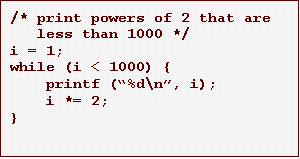
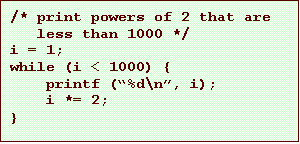
while loop examples
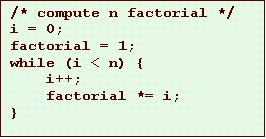
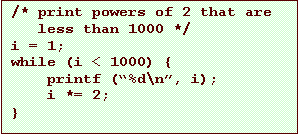
while loop examples

while loop examples
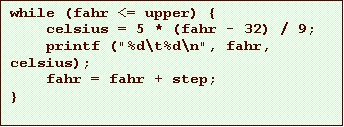
for loops
for ( expr1; expr2; expr3 ) statement
• This is (almost) equivalent to writing:
expr1;
while (expr2) {
statement
expr3;
}
• This is easiest to see by example.
for loops
for ( expr1; expr2; expr3 ) statement
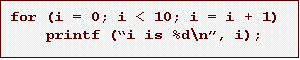
• In an early lecture, we saw a program with this for loop:
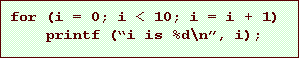
• In this case:
– expr1
is i = 0
– expr2
is i <
10
– expr3
is i = i
+ 1
– statement
is printf
(“i is %d\n”, i);
for loops
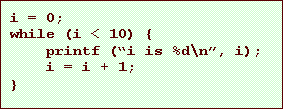
• And we could have written this for loop
using while instead
for loop examples
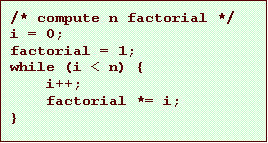
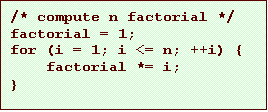
for loop examples