Lecture #11: Statements 2
Bob Pitha
bpitha@cs.ucsd.edu
http://www-cse.ucsd.edu/classes/fa99/cse5a
what’s a statement?
• A specification of some action to be performed
• Executed sequentially
what kinds of statements do we have?
• Expression statements
• Compound statements
• Selection statements
• Iteration statements
• Jump statements
what kinds of statements do we have?
•
Expression statements
• Compound statements
• Selection statements
• Iteration statements
• Jump statements
example
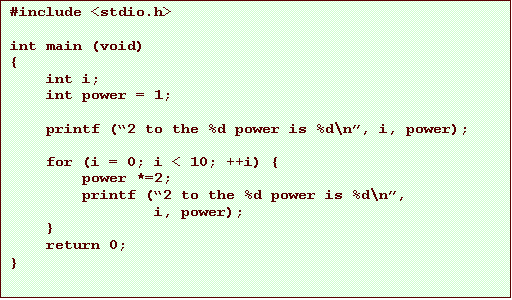
• printing powers of 2

what kinds of statements do we have?
• Expression statements
•
Compound statements
• Selection statements
• Iteration statements
• Jump statements
compound statements
• Another example:
what kinds of statements do we have?
• Expression statements
• Compound statements
•
Selection statements
• Iteration statements
• Jump statements
what’s a selection statement?
• Selects statements to execute based on the value of an expression
– the expression is sometimes called the controlling expression
• These are more interesting statements
• selection statements:
– if statement (§3.2-3.3)
– switch statement (§3.4)
selection statements: if
• Used to execute conditionally a statement or block of code
• Critical to writing interesting programs - otherwise, the code always follows the same path.
simple if statement
if ( expression ) statement
• Expression must have a scalar type
– can’t be an array or complex data structure
• but we don’t know about those anyway
• If the expression evaluates to true (i.e. non-zero) then statement is executed
• Remember what we said about compound statements
– they are valid anywhere a single statement is valid
– so you can use a block here
if statement examples


if statement examples

if-else statement
if ( expression ) statement1 else statement2
• If expression evaluates to true, statement1 is executed.
• If expression evaluates to false (0), statement2 is executed
• Both statements can be (and very often are) compound statements
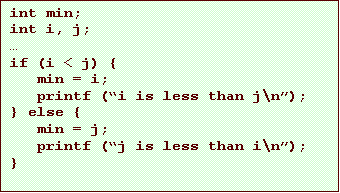
if-else example
a comment on style
• I wrote the generic syntax as:
if ( expression ) statement1 else statement2
and your book says:
if ( expression )
statement1
else
statement2
• What’s the difference?
– there isn’t any, to the compiler
if statement style
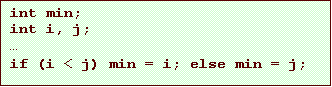
• Wherever a space is valid, you can also use a newline
– so the two statements are identical
– but it’s easier to read the second one
if statement style
• It’s also easier to read code when nested blocks are indented
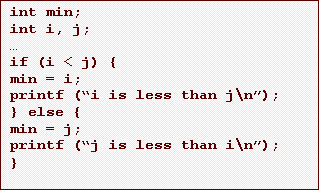
if statement style
• It’s also easier to read code when nested blocks are indented

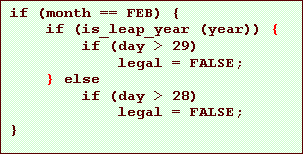
nesting of if statements
• You can use any statement as the body of an if
– even another if statement
discussion of if statements
• if statements let you distinguish between exactly 2 cases, and do something different for each.
• They are very powerful
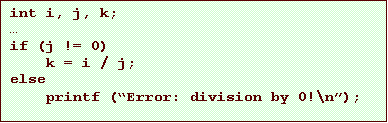
– many computer programs need to react to changing circumstances or different input
– computer programs need to check for bad data or error conditions
• before the error or the bad data cause the program to crash
but what about 3 or more cases?
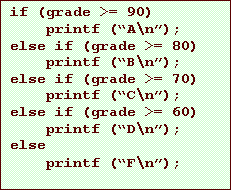
• We can simulate this using nested ifs:

but we can write this more readably
• We’ll just break our new style rules