CSE 160 Homework #3: Message Fragmentation
Due: Tuesday 10/20/06 in class
The objective of this assignment is to implement message
fragmentation.
In the
Ring
program used in the last assignment,
the nodes pass around messages of
equal length. In this assignment, we'll modify
Ring
to simulate a
store-and-forward packet network where message buffer sizes are not
uniform,
and explore how
packetization affects performance.
Your program will perform the following:
- Read in configuration information from
stdin.
The input
will be a text file with P rows and 2 columns, 1 row for each processor. Each row
i
lists processor i's buffer size and destination processor:
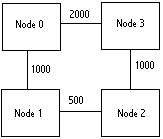
So a file that looks like the following
- 1000 1
- 500 2
- 1000 3
- 2000 0
|
|
- will create a network that sends data in 1000-byte chunks from Node 0
to Node 1, 500-byte chunks from Node 1 to Node 2 and so on as shown in
the figure.
-
Your code will split and merge the packets as they flow
around the network. Data will always start and end at Node 0. In the example
above, a 2000-byte packet's life would begin by being sent out from Node
0 to Node 1 as two packets, then split into four packets as it is transmitted
from Node 1 to Node 2, sent as two 1000-byte packets from Node 2 to Node
3, then assembled into one 2000-byte packet at Node 3 and finally sent
back to Node 0.
-
When Node 0 finishes receiving data each loop around, it will compute a
checksum
it to verify that it was sent around the network correctly. A simple
eXclusive OR (XOR) function of all the bytes
in the packet is sufficient. This will
help you debug your code.
-
Your code must properly handle the case when
data is insufficient to fill a downstream processor's buffer;
in particular, no data should be dropped.
An elegant way of doing
this is with MPI tags, nonblocking communication and MPI_Iprobe().
You may implement this capability however you wish.
-
Other than packetization, your code
should function in the same was as Ring does, timing
messages with sizes progressing by powers of two.
Run for a sufficient number of trips so that
your timing samples are reasonably long, and run out to
message sizes up to 4 Megabytes.
Run your packetized version of Ring with a variety of message sizes,
buffer sizes, node connections and loops around
the network. Run on 4 and 8 CPUs, specifying
2 CPUs per node to conserve resources.
Although this arrangement will slow down communication—due to contention on the
nodes—it will also increase the amount of available resources by a
factor of two.
To use both CPUs, you must use a machine file, which lists
each node exactly twice.
compute-0-11
compute-0-11
compute-0-15
compute-0-15
-
Use a uniform packet buffer size of 4 megabytes,
that is, all buffers have the same length, and will
be sufficient to store any message.
Your results should match that of Ring,
up to a message length of 4 Megabytes.
Is there any performance penalty?
-
Use a uniform packet buffer sizes of 512 kilobytes, 64 kilobytes, and 8
kilobytes. In each case, all buffers have the same length, but longer messages
will be packetized, and subsequently coalesced (joined) upon
return to processor 0.
-
Use packet sizes of 4KB, 1KB, 4KB, 1KB, on processors 0 through 3,
respectively.
Graph your results. Compare and contrast
with the data from the standard version of Ring. Describe any interesting
results and theorize why they are happening.
We will test against other inputs.
What to turn in
Document your work in a written report of about 2 to 4 pages-
not including plots.
Your report should present a clear evaluation of the performance you observed
from your experiments. Present clear explanations of your plots—in addition
to explaining the shapes of the curves.
Turn in hard copy of your writeup—but not source listings.
Mail an electronic copy of
your writeup, plots, and source code, and mail to
hskim at cs DOT ucsd DOT edu, with the subject line "cse 160:A3"
Pack everything you want us to grade into a single archive file.
The name of your archive file should begin with your login ID,
followed by the underscore character '_' followed by "A3,"
i.e.
cs160x_A3.zip. Your archive file
should create a directory with the name of your login ID. Be sure and
delete all .object (.o) files and executables before creating the
archive.
Use your favorite plotting program such as
gnuplot
or matlab.
You may download gnuplot from its
home page.
Mac users may obtain gnuplot from Fink Commander.
Copyright © 2006 Scott B. Baden. Last modified:
10/08/06 08:32 PM