ABEL Truth Table Tutorial
1) Click on HDL editor

2) Select "Use HDL Design Wizard"

3) Click Next
4) Select ABEL

5) Choose the name of the file in which your design will be saved
6) Define your input pins by clicking on new and then typing a name for each of them

7) Do the same for your outputs but check "Output" as the direction
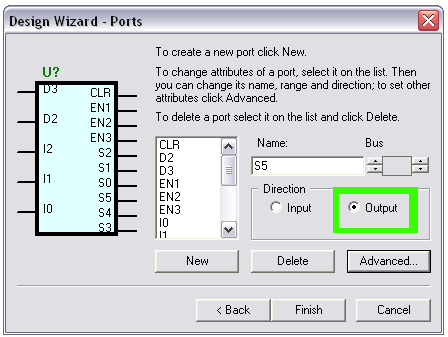
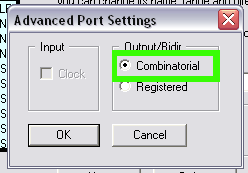
8) For each output, be sure to click on "Advanced" and change the output type to combinational
9) You should now have all your inputs and outputs defined. Click Finish and the computer will generate an ABEL file with the pins defined
10) Now you need to add your truth table to the section entitled "Equations". There should be a comment that says something like "add your equations here". In that section, replace the comment with your truth table using the following syntax:
TRUTH_TABLE([ insert_input_pins_seperated_by_commas ] -> [insert_output_pins_here_seperated_by_commas])
The actual truth table will follow and will consist of the input combination follow by "->" and the output combination. You must have a value for EVERY pin on EVERY line of the table. For the values you can use "0" and "1", or ".X." (period-X-period) for don't care.
For example, a truth table for the machine above will be defined as follows. I have included the row that outputs a 1 to CLR when the input for I2=I1=I0=0. The rest of the values are don't cares:
TRUTH_TABLE ( [D3,D2,I2,I1,I0] -> [CLR,EN1,EN2,EN3,S2,S1,S0,S5,S4,S3] )
[ .X.,.X.,0, 0, 0 ] -> [ 1,.X.,.X.,.X.,.X.,.X.,.X.,.X.,.X.,.X. ];
Good luck with your control system